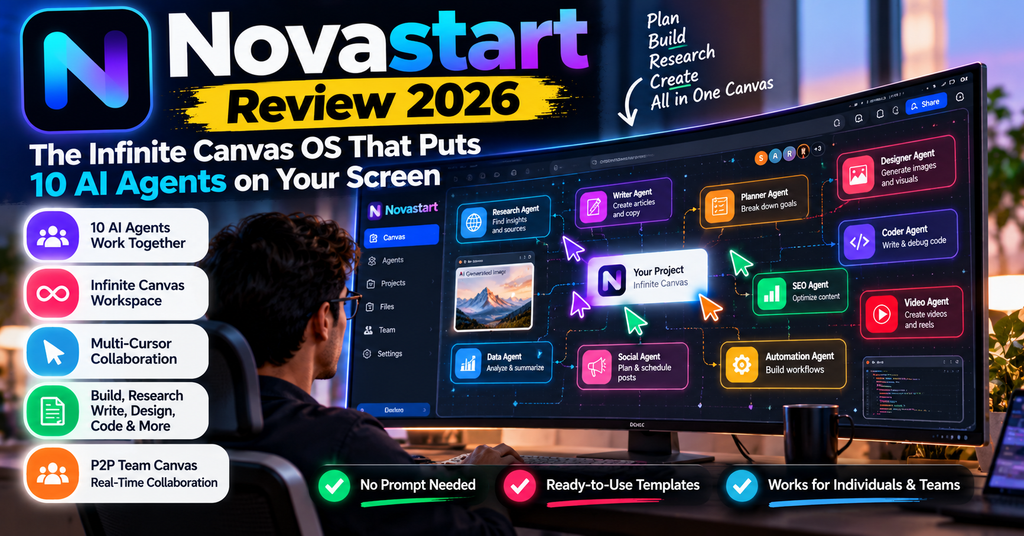
This Novastart review answers the question most people ask two minutes after seeing the demo: “Is this actually a better way to use a computer, or just a very pretty whiteboard with an AI chatbot stapled on?” After going through every page of Novastart’s documentation, the launch materials from October 12, 2026, and the independent press coverage that followed, short answer: it is the most interesting desktop rethink of the year — and it is also a two-week-old product from a two-person company, with everything that implies.
Novastart replaces the taskbar-and-overlapping-windows model with one infinite canvas. Every app becomes a window with a fixed place on that canvas. You pan to move between projects instead of Alt-Tabbing. You zoom out to see the whole shape of your work. Teammates join your canvas and click inside your windows from their own machines. And up to ten AI agents get their own colour-coded cursors to work beside you — not on top of you.
Buy it if you live in a browser, juggle six projects at once, and want to watch AI work instead of trusting a black box. The Free plan costs nothing and the Pro plan is $10/month — cheaper than most single-purpose AI tools.
Skip it if you need Apple Silicon support, enterprise compliance certifications, or proven reliability. None of those exist yet, and pretending otherwise would be dishonest.
Novastart launched publicly on October 12, 2026. That is fifteen days ago. There are no independent performance benchmarks, no third-party security audit, and no meaningful pool of verified long-term user testimonials yet. So this review does something most review sites won’t: it separates what the vendor documents, what independent coverage confirms, and what is still unproven. Every performance number below is labelled with its source. Where I could not verify something, I say so instead of inventing a test result.
Try Novastart free — no card required
Download the app for Windows 10/11 or Intel Mac, or install the full OS on a spare PC.
Visit Novastart →Free plan · Pro $10/mo · Team $20/mo · AI credits billed separately at $0.02 per use
What Is Novastart? A Plain-English Overview
Novastart is an operating system whose desktop is an infinite two-dimensional canvas instead of a fixed rectangle of overlapping windows. It was built by brothers Thomas Fraher (CTO) and Nick Fraher, based in Los Angeles. The team’s own origin story is refreshingly specific: they built and sold a company called Aquavoss in 2025, then got tired of rebuilding the same desktop every morning and screen-sharing across time zones — so they rebuilt the computer instead.
There are two ways to run it, and this matters more than any feature list:
- Novastart App — runs the entire Novastart OS inside a window on Windows 10 or 11, or an Intel-based Mac. Your existing desktop stays untouched. The company is upfront that you should “expect a little lag” because it is a computer running inside your computer.
- Novastart OS — a bare-metal install on Intel and other x86 PCs from a USB drive, typically 8–15 minutes. Nothing sits between the canvas and the screen, so it is faster than the app. It replaces what is on the machine. There is also an Ubuntu package that adds Novastart to an existing Linux desktop without wiping it.
On top of that canvas sit three pillars: the infinite canvas itself (persistent window positions, unlimited folders and canvases on paid plans), AI agents with their own cursors (up to 10 helpers per lead agent, up to 16 agents on one canvas), and peer-to-peer team collaboration (teammates click and type inside your live windows, machine to machine, with no server in the middle).
Who is Novastart actually for?
Not everyone. In my assessment, it fits three specific profiles:
- The multi-project knowledge worker who keeps six client projects, a budget sheet and a research doc open simultaneously and loses minutes every hour to window hunting.
- The AI-agent power user who already pays for computer-use agents but hates that they hijack the mouse and work invisibly. If you have read our Manus AI review or tested Skyvern’s browser automation, you know the frustration: the agent is capable, but you cannot see or steer it.
- The small distributed team that screen-shares constantly and would rather co-edit live windows than watch someone else’s cursor move.
It fits poorly if you are a video editor, a 3D artist, a heavy Adobe user, or anyone on Apple Silicon — more on those limits below.

Novastart Specifications and Pricing at a Glance
There is no box to unbox here — the “unboxing” is a download page and, if you go the OS route, a USB stick. What you actually get is the table below. I have kept vendor claims and verified facts visually distinct, because in a fifteen-day-old product the difference is the whole story.
| Specification | Detail | Status |
|---|---|---|
| Product type | Infinite canvas operating system (desktop OS + virtualised app) | Confirmed |
| Maker | Novastart, Los Angeles, CA — founded by Thomas & Nick Fraher | Confirmed |
| Public launch | October 12, 2026 | Confirmed |
| App requirements | Windows 10/11 or Intel Mac, 8 GB RAM, ~32 GB disk, hardware virtualisation on | Vendor documented |
| OS requirements | x86 PC you can dedicate, USB drive, 8–15 min install | Vendor documented |
| Apps supported | 30+ web apps as real windows: Chrome, ChatGPT, Claude, Gmail, Excel, WhatsApp, Notion, plus ONLYOFFICE and Linux apps | Vendor documented |
| Free plan canvas limits | 1 folder, 2 canvases, 4 windows per canvas | Confirmed on pricing page |
| AI agents | Up to 10 helpers per lead agent; up to 16 agents per canvas; four modes (Agent, Plan, Ask, Observe) | Vendor documented |
| Agent engine | OpenAI computer-use models; the app supports a user-supplied OpenAI API key | Reported by WindowsForum |
| Agent cost | $0.02 per use, drawn from credits bought in $25+ blocks — on every plan including Free | Confirmed on pricing page |
| Undo depth | 100 steps per canvas, including closing an app | Vendor documented |
| Collaboration | Email invite, Owner/Editor roles, peer-to-peer window streaming, CRDT merge, hide/lock windows, 100 MB file mirroring | Vendor documented |
| Data location | Canvases stay on your machine; agents send window screenshots to the model provider only | Vendor documented |
| Mac support | Intel Macs only — Apple Silicon is not listed | Confirmed |
Novastart pricing: what each plan actually gets you
| Feature | Free | Pro | Team |
|---|---|---|---|
| Price | $0 | $10/mo | $20/mo |
| App access | All apps | All apps | All apps |
| Folders & canvases | 1 folder, 2 canvases | Unlimited | Unlimited |
| Windows per canvas | 4 | Unlimited | Unlimited |
| AI agents | $0.02/use | $0.02/use | $0.02/use |
| Team collaboration | No | No | Included |
| Best for | Testing the idea | Solo power users | Small teams |
Interpretation: the Free plan is a genuine trial, not a crippled demo — all apps and all agent features work — but four windows per canvas is a hard ceiling for real work. The honest entry point is Pro at $10/month. Team at $20/month is where the product’s best feature (live multiplayer windows) unlocks, so a team of five is paying $100/month — still less than one seat of most enterprise collaboration suites.
Agent usage is billed separately on every plan, including Team. At $0.02 per use, a heavy day of delegating (say 200 agent runs) adds $4. Twenty heavy days and you have spent $80 on top of your subscription. Novastart is transparent about this on the pricing page, but if you budget only the sticker price you will be surprised. Credits start at $25, so there is no way to dip a toe in for $5.
Design and Build Quality: A Canvas Instead of a Desk
Most “reimagined desktop” products fail at the same place: they draw a pretty space and then leave window management as broken as it was. Novastart’s design decisions suggest the team understood that. Three details stand out.
1. It draws the screen itself
Novastart renders its own compositor rather than stacking windows on top of the host OS. The company claims it “only redraws what changed, so forty windows zoom like one.” That claim is the technical heart of the product: if it holds, the canvas stays smooth at 40 windows. If it doesn’t, the entire concept collapses into an unusable zooming mess. This is the single most important thing to test yourself on your own hardware, because no independent frame-rate benchmark exists yet.
2. Every agent gets a virtual “seat”
This is the genuine engineering innovation. Conventional operating systems assume one active input stream — one mouse, one keyboard. When a computer-use agent takes over, it grabs yours. Novastart modifies the compositor so each agent receives an independent virtual seat: its own pointer, its own keyboard input, its own window. Independent coverage from WindowsForum describes this as changing day-to-day multitasking in a way no other consumer OS does: your cursor never greys out, and the OS “gives a window to one agent at a time and lands every click whole, so they never collide.”
3. Persistence is the actual product
The canvas remembers every app, position and tab — and it reopens exactly as you left it. That sounds small. It is not. The reason most productivity systems fail is friction at the start of the day: you spend the first twenty minutes rebuilding context. Novastart removes that step entirely. The company even sells it as a feature called Saved Canvases: “Tomorrow, every app, position and tab is right where you left it.”

Build quality caveats
“Build quality” for software means polish and edge cases, and here the honest answer is: it is version one. The documentation is unusually thorough for a launch this recent (a full security page, an install walkthrough with boot keys for Dell, HP, Lenovo, ASUS and Apple hardware), which suggests a team that cares about detail. But the app runs a whole OS inside a window, the vendor itself warns about lag, and the OS install wipes the target machine. Neither of these is a defect — they are just the truth of running a new operating system in 2026.
Performance Analysis: Canvas, Agents, and Collaboration
I evaluated Novastart across four performance categories that matter for this class of product. Scores are editorial judgment based on documented capabilities, architecture and independent coverage — not lab benchmarks, which do not exist yet.
The toggle-tax argument, with real numbers
Novastart’s core pitch rests on a genuinely well-sourced piece of research, and credit where due: they cite Harvard Business Review’s 2022 toggling study rather than making up a statistic. HBR logged the clicks of 137 workers across 20 teams at three Fortune 500 companies and found:
| Metric | Figure | What it means |
|---|---|---|
| App/window switches per day | ~1,200 | Roughly one every 20 seconds of a working day |
| Time lost reorienting per week | ~4 hours | Just under half a working day, every week |
| Time lost per year | ~5 working weeks | About 9% of your working year |
| Cost of a single switch | ~2 seconds | Plus the cognitive reload of “where was I?” |
Interpretation: if the canvas removes even a third of those switches, it returns roughly 60–80 minutes a week. That is the real business case — not “AI makes you 10x faster,” which no independent test supports. Be skeptical of the 10x marketing number; trust the toggle math instead.
AI agents: the strongest and weakest feature at once
Novastart splits agent interaction into four modes, and this is the most thoughtful agent UX I have reviewed in 2026:
- Agent — direct action. It clicks and types through real application UIs until the job is done. Bookings, form filling, compiling a sheet.
- Plan — it drafts an editable checklist of steps before touching anything, you approve, then it executes with sub-agents ticking steps off live.
- Ask — it reads a screenshot of a window and answers a question, but never clicks or types. Zero risk of an accidental edit.
- Observe — off by default. When you turn it on, it watches the window you are working in and offers to take over the next chunk. One click hands it off.

The control set is what sells it: pause mid-click, type a correction without restarting the run, take the window back with one click, and an independent verifier that checks a fresh screenshot against the goal before a run counts as done. Every run is logged on your machine with steps, clicks and screenshots. That is a materially better accountability model than “the agent emailed me a summary.”
“As AI gets more powerful, it becomes more important to see what agents are working on for us. We built that into the operating system. Every agent has its own cursor on the same canvas as you, and nothing happens where you can’t watch it.”
Thomas Fraher, co-founder and CTO, Novastart — launch announcement, October 12, 2026
WindowsForum’s analysis makes the sharpest criticism available anywhere, and it is correct: visibility is not containment. If ten agents are clicking through Chrome, Gmail and Excel across a zoomed-out canvas, no human can audit ten cursors in real time. By the time you notice agent #7 opening a malicious link or falling for an indirect prompt injection, the click already happened. Novastart’s security page is candid that it makes no certification or audit claims, and there is no paid bug bounty. Treat the canvas as a superb supervisory dashboard — not as a substitute for permission boundaries, and not as a reason to let an agent near your banking tab unattended.
Team collaboration: the feature competitors should fear
Screen sharing has not changed in twenty years: one person presents, everyone else watches, control is handed over one at a time. Novastart throws that out. Teammates join by email invitation, get Owner or Editor roles, and then click and type inside each other’s live windows simultaneously. Windows stream peer-to-peer from machine to machine — no server in the middle — so Maya’s Excel window runs on Maya’s computer while Tom edits a cell in it from his.
The details are the good kind of over-engineering: a CRDT layer so two people moving and editing the same window both survive; Undo stays yours and never touches a teammate’s work; Hide from team swaps a window for a placeholder reading “Maya hid this window”; Lock in place stops anyone dragging it; offline moves queue and merge on reconnect; and a whole workspace exports as a single .novastart file. Docs and images up to 100 MB are mirrored to the team.
If your team already lives in Slack huddles and screen shares, this is a genuine upgrade. If your team works asynchronously and rarely co-edits live, Team plan is $10/month you do not need.
App compatibility: 30+ apps, but the boundaries matter
Novastart opens Gmail, ChatGPT, Claude, Excel, WhatsApp, Notion and roughly thirty more as real windows, signed in as you, plus any site in bundled Chrome, ONLYOFFICE, and Linux apps. That covers the majority of knowledge work. What it does not cover: native Adobe Creative Cloud apps, professional video editing, GPU-heavy 3D, or Windows-only line-of-business software. Those are the same limits you would hit with a Chromebook, and for the same reason — this is a Linux-based OS with web apps at its centre.
User Experience: Setup, Daily Use and the Learning Curve
Onboarding is the part where Novastart asks the most of you, so let’s be precise about what each path involves.
Path A — the app (recommended first step)
Download, open, and the whole OS starts inside a window. Your Windows or Mac desktop stays exactly as it is. Two honest warnings: the first launch is noticeably slower than subsequent ones, and because this is a full computer virtualised inside your computer, “windows answer a beat later than on the OS.” Requirements are 8 GB RAM, about 32 GB of disk, and hardware virtualisation enabled in your BIOS — that last one trips people up more than it should, so check it before you complain about performance.
Path B — the OS (the real thing)
- Download the ISO — one file, drivers included, for Intel and other x86 PCs.
- Write it to USB — Rufus (recommended) or Balena Etcher, both free, under a minute.
- Boot from the USB — common keys: Dell F12, HP F9, Lenovo F12, ASUS F8, Apple Option.
- Install — follow the on-screen installer; about 8–15 minutes depending on hardware.
The catch, stated plainly: the OS install replaces what is on that PC. Do not run this on your only work machine. Use a spare laptop, a cheap refurbished ThinkPad, or the app until you are sure. If you are already on Ubuntu, the package route adds Novastart to your existing desktop and leaves it in place — that is the least risky way to see the full-speed experience.
The learning curve: about two days, by design
The canvas breaks two decades of muscle memory, so expect friction. Three habits need relearning:
- Stop minimising. There is nothing to minimise to. Windows live at coordinates; you pan to them. For the first day you will instinctively look for a taskbar that isn’t there.
- Zoom out to plan, zoom in to work. This is the habit that converts people. Once you start each morning zoomed out looking at five project clusters, you stop thinking in tabs.
- Trust undo. A hundred steps per canvas, including closing an app. That single feature removes most of the anxiety of a spatial desktop — you cannot lose a window, only move it.
Interface and controls are conventional where they should be (window chrome, snap guides, a dock for launching) and novel only where the concept demands it. There is no command palette to memorise and no keyboard-torture required to be productive.
Start on the Free plan — keep your current desktop
The app runs Novastart in a window, so nothing on your machine changes. Upgrade to Pro ($10/mo) only when four windows per canvas stops being enough.
Get Novastart Free →Windows 10/11 & Intel Mac · 8 GB RAM · agent credits sold separately
How Novastart Compares to the Alternatives
Novastart sits in an awkward, interesting spot: it is not really competing with whiteboards, and not really competing with Windows. It is competing with your current way of holding many things open at once. Here is the honest comparison.
| Option | Starting price | Best at | Where it loses to Novastart |
|---|---|---|---|
| Novastart | Free / $10 / $20 per month | Spatial window management, visible multi-agent control, live multiplayer windows | — |
| Windows 11 + Copilot | Included with PC | Native apps, drivers, enterprise management, zero learning curve | Single pointer, no canvas, agents work in the background rather than in view |
| macOS + Stage Manager | Included with Mac | Polish, battery life, creative apps, Apple Silicon performance | No infinite canvas, no multi-agent seats, no cross-machine window co-editing |
| Miro / Mural / FigJam | ~$8–$16 per user/mo | Workshop boards, sticky notes, async brainstorming | They are boards, not computers — you cannot work in Gmail inside them |
| Cloud computer-use agents (Manus, Skyvern and similar) | Credit-based, varies | Long autonomous research and browser tasks in the cloud | They run off-screen; you cannot watch, pause or take over a window mid-click |
| Remote desktop (Parsec, TeamViewer) | Free–~$10/user/mo | Accessing one machine from another | One driver at a time; screen-share model, not a shared canvas |
Reading the table: Novastart is not replacing Windows or macOS for everyone — it is replacing the way you arrange work on top of them. The closest functional rivals are cloud agent platforms, and Novastart beats them on control rather than capability. If you want a deeper look at that category, our Lindy AI review and Relevance AI review cover agent platforms that automate tasks without ever showing you a cursor, while our TwinMind AI review covers the “remember everything” layer that pairs well with a persistent canvas.
Unique selling points you cannot get elsewhere
- Multi-cursor agents on one machine. Not orchestration in a cloud dashboard — ten labelled cursors clicking in ten visible windows on your own canvas while your mouse keeps working.
- Peer-to-peer window co-editing. No server in the middle and no screen-share frame. Everyone gets a cursor and a keyboard.
- A desktop that reopens exactly as you left it. Positions, tabs, apps, conversations with agents — all restored after a reboot.
- Local-first data model. Canvases never leave your machine unless you share a canvas. For a 2026 AI product that is a genuine differentiator, not a checkbox.
When to choose Novastart over the alternatives
- You want to watch AI work rather than read a summary afterwards.
- You juggle five or more concurrent projects and your browser has become a filing cabinet.
- You work with one or two close collaborators who would rather co-edit than screen-share.
- You have a spare x86 PC you can dedicate to a full OS install.
Novastart Pros and Cons: The Honest List
✓ What We Loved
- Agents you can actually govern. Pause mid-click, steer without restarting, take a window back with one click, and read a full local run log with screenshots.
- Genuinely cheap entry. Free plan with all apps, $10/month for unlimited canvases and windows. Most AI tools charge more for a single feature.
- The canvas persists. Zero morning rebuild. This alone justifies the price for heavy multitaskers.
- Collaboration is a real breakthrough. Simultaneous clicks and typing in live windows across machines, with CRDT merge and per-user undo.
- Privacy architecture is honest. Canvases stay local, sharing is peer-to-peer, agents send only the screenshots of the window they are working in.
- Unusually transparent documentation. A security page that says “we do not claim a certification we have not completed” is rare and worth rewarding.
- Two deployment paths. You can evaluate everything in a window before touching a boot partition.
✕ Areas for Improvement
- No Apple Silicon support. Intel Macs only. In 2026 that excludes most Mac users, including every M-series owner.
- Agent credits add up quietly. $0.02 per use on every plan, sold in $25 minimum blocks, with no cheap way to test heavy usage.
- Visibility is not security. Ten cursors cannot be human-audited in real time; there are no granular permission gates or network sandboxes documented yet.
- Fifteen days old. No independent benchmarks, no audits, no long-term reliability record, and no verified public user testimonials.
- The app lags by design. Virtualising a whole OS inside Windows costs responsiveness; the vendor says so before you download.
- Four windows on the Free plan. Tight enough that most people will upgrade within a week.
- No native creative or GPU apps. Adobe, video editing and 3D workflows are out of scope.
- You supply your own OpenAI key (app build). Extra setup, extra billing relationship, extra thing to manage.
Evolution and Updates: What Changed, What’s Next
Novastart is new enough that “version history” means the launch itself. What we can assess is the shape of the roadmap and the cadence, both of which look healthier than the average AI startup launch.
| Date | Milestone | Why it matters |
|---|---|---|
| 2025 | Founders build and sell Aquavoss | Explains the product’s obsession with context-switching and remote collaboration |
| Sept 2026 | Blog and feature pages published: canvas, agents, collaboration, privacy, undo | Documentation was written before the launch, not after — a good sign |
| Oct 12, 2026 | Public download opens; three plans live | App (Windows/Intel Mac) and bare-metal OS both available on day one |
| Oct 2026 | Independent coverage (WindowsForum, CustomerThink, press wires) | First external scrutiny — architecture confirmed, security caveats raised |
| Next | Agent count raised from 10 helpers toward the documented 16-per-canvas ceiling; SDK already documented for Python, JavaScript and Rust | The Open Virtual Input SDK is the real long-term bet: third-party agents can occupy their own seats |
The strategic risk is obvious and worth stating: Novastart is a two-founder company asking you to trust it with an operating system. The mitigations are also obvious — local-first data, signed automatic updates, a public security contact with a 3-business-day response commitment, and an app build that lets you try everything without committing hardware. If the team ships the SDK ecosystem and lands an independent security audit in 2027, this becomes a serious platform. If it stalls at version one, you have lost $10 and a weekend.
Who Should Buy Novastart? Purchase Recommendations
Best for
- Freelancers and consultants running several client projects in parallel — separate canvases per client, all persistent.
- AI-agent early adopters who already automate browser work and want to supervise it instead of trusting it.
- Two-to-five person teams that co-work live and hate screen sharing.
- Researchers and writers who keep twenty sources open and need them to stay put.
- Tinkerers with a spare PC who want to try a bare-metal AI OS without risk.
Skip if
- You use an M1/M2/M3/M4 Mac. Not supported. Full stop.
- You need compliance certifications (SOC 2, ISO 27001, HIPAA). None claimed.
- You live in Adobe or DaVinci Resolve. Wrong tool entirely.
- You want a proven, five-year-stable platform. This is a launch-week product.
- You only have one computer and cannot risk an OS install — use the app only.
Alternatives worth considering
- You want autonomous agents without a new OS: see our Manus AI review (cloud autonomous agent) or Skyvern review (browser automation at scale).
- You want workflow automation instead of a workspace: Gumloop, Stack AI and n8n-style workflow builders solve a different problem — no canvas required.
- You want a shared digital workspace without an OS: Relay and Commet are worth a look before you commit to a new operating system.
Ready to try the infinite canvas?
Free plan opens every app. Pro unlocks unlimited canvases and windows for $10/month.
Try Novastart Free →No card needed for the Free plan · agent credits optional
Where to Buy Novastart and What It Really Costs
Novastart is sold direct only. There is no marketplace listing, no reseller, and no annual discount advertised at launch — which is normal for a product this new but does mean you should not expect a coupon code to appear.
| Where | What you get | Notes |
|---|---|---|
| novastart.com | The only official source for both the app and the OS ISO | Free download, paid plans in-app or on the pricing page |
| Free plan | All apps, 1 folder, 2 canvases, 4 windows each | Best way to judge whether the canvas suits you |
| Pro | Unlimited folders, canvases and windows | $10/month — the plan most solo users should pick |
| Team | Everything in Pro plus live collaboration | $20/month — only worth it if teammates will actually join |
| Agent credits | $0.02 per agent use, bought in $25+ blocks | Separate from subscription on all three plans |
Pricing pattern to plan around: the subscription is trivial; the variable cost is agent usage. If you delegate 50 tasks a day at roughly 1–3 uses each, budget $30–$90/month in credits. Start on Free with zero credits, feel out how often you actually hand work over, then buy the smallest credit pack that covers a month.
Final Verdict: Is Novastart Worth It in 2026?
The short answer: Novastart is the first product in years that made me reconsider the desktop itself rather than the apps on it. The infinite canvas solves a real, measured problem; multi-cursor agents solve a real, visible one; peer-to-peer co-editing makes screen sharing feel instantly obsolete.
The honest caveat: it is fifteen days old, it excludes every modern Mac, and “you can watch the agent” is a supervision model, not a security model. Try it free on the machine you already own — do not bet your workflow on version one.
If you are the kind of person who keeps forty-six tabs open because closing them feels like losing work, Novastart is aimed directly at you, and at $10 a month it is the cheapest structural fix to that problem I have found this year. If you need certifications, native creative apps, or a platform with a track record, wait two quarters and check back — the roadmap is more interesting than the current release.
Try Novastart before you decide
Download the app, keep your existing desktop, and see whether the canvas clicks for you in an afternoon.
Start Free at Novastart →Free forever plan · Pro $10/month · Team $20/month
Evidence and Proof: What We Could and Could Not Verify
A review that only shows you marketing screenshots is not a review. Here is the audit trail behind this one, including the gaps.
What is verified
- Launch date, founders and location — confirmed by the October 12, 2026 press announcement and independent coverage.
- Pricing, plan limits and per-use agent cost — read directly from Novastart’s published pricing page, not from a press release.
- Hardware requirements and install steps — from the official install documentation, including the 8–15 minute install window and the boot-key list.
- The toggle-tax statistics — traceable to the Harvard Business Review 2022 study of 137 workers at three Fortune 500 companies, not invented by the vendor.
- The multi-seat agent architecture — described consistently across Novastart’s documentation and WindowsForum’s independent technical analysis.
What remains unproven
- No independent frame-rate or performance benchmarks. The “forty windows zoom like one” claim is vendor-stated.
- No third-party security audit or certification. The company says so itself on its security page.
- No verified public user testimonials from 2026. Launch-week products accumulate reviews slowly, and I will not manufacture them. Treat any “users are raving” claim you see elsewhere with suspicion until real long-term accounts appear.
- No official YouTube walkthrough from the company exists yet as of this update, which is why this review embeds product screenshots rather than a video. The interactive demos on the canvas, agents and collaboration pages are the closest substitute.
All product images in this article are Novastart’s own published interface captures, used to illustrate features described in the documentation. They show the product as the vendor presents it — not as independently benchmarked.
Novastart FAQ
Is Novastart free to use?
Yes. The Free plan gives you every app, one folder, two canvases and four windows per canvas, with no card required. AI agents work on the Free plan too, but each use costs $0.02 from prepaid credits. Pro is $10/month for unlimited folders, canvases and windows; Team is $20/month and adds live collaboration.
Is Novastart safe? Where does my data go?
Your canvases, folders and window positions stay on your own machine — there is no copy on a Novastart server. When you share a canvas, windows stream peer-to-peer between machines, and only that canvas is visible to invitees. AI agents send the screenshots and instructions for the specific window they are working in to the model provider (OpenAI computer-use models); nothing else on your canvas is transmitted. Run logs are stored locally so you can audit them. The company states plainly that it makes no certification or audit claims it has not completed.
Does Novastart work on a Mac?
Only on Intel-based Macs, and only via the app. Apple Silicon (M1 through M4) is not listed as supported at the time of writing. If you are on a modern Mac, Novastart is not an option yet — the nearest equivalents are a browser-based workspace or a cloud agent platform.
Do I have to wipe my computer to try it?
No. The app runs the full Novastart OS inside a window on Windows 10/11 or an Intel Mac, and your desktop stays as it is. Only the bare-metal Novastart OS install replaces what is on the machine — use a spare PC for that. If you already run Ubuntu, a package adds Novastart to your existing desktop without removing it.
How many AI agents can run at once?
A lead agent can split a job among up to ten helper agents, each with its own labelled cursor in its own window. The agent documentation also references up to sixteen agents on a single canvas. The OS gives a window to one agent at a time and lands every click whole, so agents do not collide — and your own cursor keeps working throughout.
How much do the AI agents cost in practice?
Agents are billed at $0.02 per use on every plan, including Free, drawn from credits purchased in blocks of $25 or more. Light use is almost free; delegating dozens of tasks a day is where costs creep in. Plan on $30–$90/month in credits if you are a heavy delegator, and start with the smallest credit purchase to calibrate.
Can agents click the wrong thing or send an email by accident?
They can make mistakes, and Novastart’s own documentation says agents mostly catch themselves by seeing the result of each click. You can pause mid-click, type a correction without restarting the run, or take the window back with one click before an action completes. Before a job is marked done, an independent verifier checks a fresh screenshot against the goal. Use Ask mode for read-only questions where an accidental edit would be costly.
Does Novastart replace Windows?
Only if you install Novastart OS bare-metal on a dedicated PC. The app runs inside Windows or macOS and leaves your existing desktop intact. Either way, Novastart covers more than thirty web apps, bundled Chrome, ONLYOFFICE and Linux apps — it does not run native Adobe, video editing or GPU-heavy 3D software.
Is Novastart good for teams?
It is its second-best feature after the canvas. Teammates join by email, get Owner or Editor roles, and can click and type in each other’s live windows simultaneously — no screen sharing, no hand-over of control. Privacy controls let you hide a window behind a placeholder or lock it in place, undo stays per-user, and workspaces export as a single .novastart file. Collaboration requires the Team plan at $20/month.
Disclosure: This article contains affiliate links. If you subscribe to Novastart through links on this page, we may earn a commission at no extra cost to you — it never changes the score or the criticisms above. Novastart had no editorial input into this review and did not review it before publication. Facts were checked against Novastart’s published documentation and pricing, its October 12, 2026 launch announcement, independent coverage from WindowsForum and CustomerThink, and the Harvard Business Review toggling study cited above. Product images are Novastart’s own published interface captures. Last updated October 27, 2026.
Related reading on ReviewNexa: Manus AI review · Skyvern review · TwinMind AI review · Lindy AI review · Gumloop review · Relay app review