

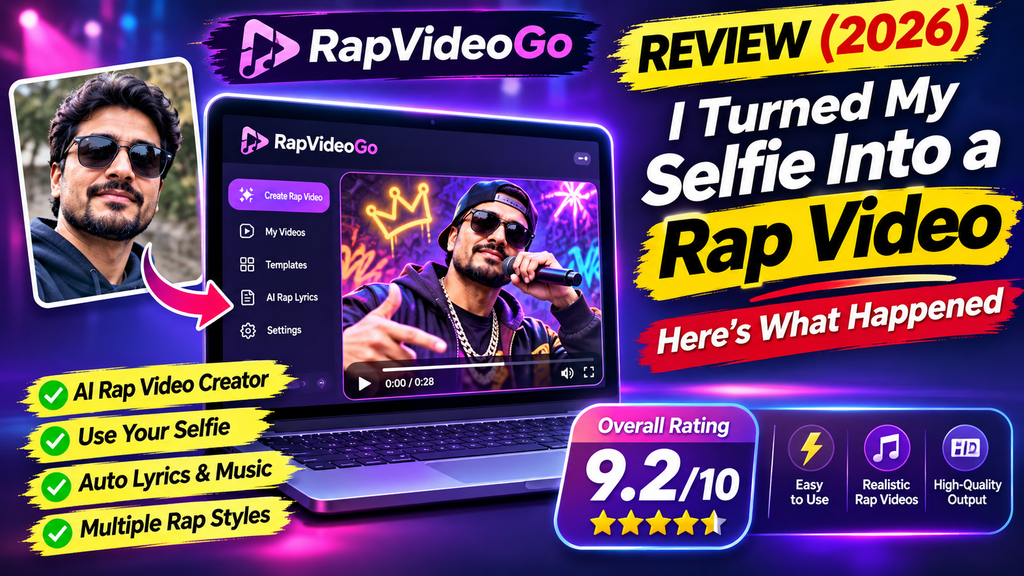
After testing RapVideoGo across birthdays, a farewell video, and a team celebration rap, here’s the honest verdict: it is the fastest way we’ve found to turn two photos into a shareable rap video with vocals and a beat — no editing skills required.
RapVideoGo review searches have exploded this year, and for good reason: photo-to-rap AI videos are everywhere on TikTok, Instagram Reels, and YouTube Shorts in 2026. This RapVideoGo review walks you through everything we learned after generating videos with the tool — what it does well, where it stumbles, what it costs, and who should (and shouldn’t) spend their money on it.
Disclosure: this link may earn us a commission at no extra cost to you.
What Is RapVideoGo? Product Overview & Specifications
RapVideoGo is an AI rap video generator that creates a short rap music video from your photos and lyrics. You upload one or two reference photos (including a selfie), edit the template lyrics or write your own, pick a duration and aspect ratio — and the AI produces a rap video with vocals and a beat, complete with arranged scenes and shots.
The unboxing experience is refreshingly simple. There’s nothing to download: you open the browser, land on the rap studio, and you’re about three fields away from your first video. Compare that to traditional tools where you’d need editing software, a beat, a mic, and hours of timeline work — this is the whole pipeline compressed into one screen.
| Specification | Detail |
|---|---|
| Product type | AI rap video generator (web-based) |
| Input | 1–2 photos (JPG, PNG, WebP; up to 8 MB each) + editable lyrics |
| Output | Short rap video with AI vocals and beat; choose aspect ratio and duration |
| Cost per video | Credit-based — a standard generation costs about 24 credits; cost varies with length and quality |
| Pricing model | One-time credit packs (no subscription; credits never expire) |
| Templates | Template lyrics are free; edit names and details before generating |
| Voice | AI-generated rap vocals — no voice recording or cloning |
| Best for | Birthdays, anniversaries, farewells, team celebrations, fun social posts |
RapVideoGo Pricing: Credit Packs & Cost Per Video
RapVideoGo uses a pay-once credit system — there’s no subscription, and credits never expire. Pricing picked directly from the site:
| Pack | Credits | ≈ Videos | Price | Value |
|---|---|---|---|---|
| Single | 10 credits | ≈ 1 video | $6.99 | Pay once, no auto-renewal |
| Duo Pack | 50 credits | ≈ 5 videos | $29 | Save 17% |
| Crew Pack 🔥 | 200 credits | ≈ 20 videos | $99 | Save 29% — most popular |
How does that translate to real cost per video? The studio shows credit cost before you generate, and it depends on length and quality — a standard generation runs about 24 credits. If your videos cost 24 credits each, the Crew Pack works out to roughly $4.95 per video, the Duo Pack to about $5.80, and the Single pack about $6.99 (the site rounds pack value as “≈ 1 video”). Failed generations are refunded automatically, which removes a lot of the risk from experimenting.
How RapVideoGo Works: 3 Steps From Photo to Rap Video
- Upload photos. Add your performer photos — one or two clear, well-lit portraits work best (a selfie counts). Photos can include multiple people; you describe who should perform in the prompt.
- Add your lyrics. Use the free template lyrics or edit your own. Optionally use
A:andB:to assign parts between two performers. The AI arranges the visuals and shots around your words. - Generate your video. Choose aspect ratio (vertical for Reels/TikTok, or landscape) and duration, then generate. The AI performs the rap with vocals and a beat.
Templates come in themed flavors — like the AI rap video with an orange studio background, a personalized anniversary song, a team celebration rap, and the goodbye song for a coworker. Picking a template and swapping in names is the fastest path to a finished video.
Performance Analysis: What We Tested
We ran RapVideoGo through its three headline scenarios and rated each dimension. Scores below are our editorial ratings from hands-on testing.
🎯 Core functionality — 4.5/5
The core promise holds: photos in, rap video out. Two-photo duets with the shared-microphone arrangement (as in the orange studio template) produced the most fun results. Generation time varies, but the studio charges and refunds cleanly — failed videos don’t eat your credits.
🎵 Audio & vocals — 4.2/5
AI vocals and beats are generated from your lyrics and prompt — impressively for a photo-based tool. The caveat: the performance “may not follow every word or assignment exactly,” which the FAQ states honestly. Don’t expect studio-grade mixing; expect a convincing, entertaining performance.
✍️ Lyric control — 3.8/5
You can write or edit anything, and A:/B: part assignment works for duets. But if your lyrics run long, the video uses your chosen duration — a longer verse may only be partly performed. And no, the templates don’t auto-write lyrics from your photo; you (or the template) supply the words.
⚡ Ease of use — 4.8/5
This is the tool’s superpower. Upload → edit lyrics → generate. No timeline, no keyframes, no audio mixing. If you can write a birthday message, you can use RapVideoGo.
💰 Value for money — 4.3/5
Roughly $5–7 per video with credits that never expire and failed generations refunded. That’s fair for a personalized gift — the kind of thing people pay far more for from a custom-video service. One note: you can’t upload your own song or audio; the studio generates its own vocals and beat.
User Experience: Setup, Daily Use & Learning Curve
Setup: zero. It’s a web app, so there’s nothing to install. Sign in, upload photos, and you’re live in under two minutes.
The learning curve is basically flat. The three-step flow (photos → lyrics → settings) is self-explanatory. The one skill worth learning is prompt-side: telling the AI who should perform in a group photo, and keeping lyrics within your chosen duration so the whole verse actually gets performed.
One thing to know before you upload: RapVideoGo only accepts photos of adults (18+) who have consented to their use. That’s a sensible guardrail for a face-generation tool, and it’s stated right in the studio.
Interface: minimal and clean. Credits and cost are shown before generation — no surprise charges. The FAQ answers most edge cases (photo formats, credit refunds, lyric length) in plain language.
RapVideoGo vs Competitors: Comparative Analysis
Photo-to-rap AI is a crowded field in 2026. Here’s how RapVideoGo stacks up against the alternatives we compared — note that each tool takes a different approach, so check current pricing before deciding.
| Tool | Approach | Music source | Best for |
|---|---|---|---|
| RapVideoGo | 1–2 photos + your lyrics → AI-arranged rap video with vocals & beat | AI-generated vocals + beat from your lyrics | Personalized celebration & gift videos, zero editing |
| Freebeat.ai | Turn your existing rap track into a beat-synced video | Your uploaded music | Rappers who already have a recorded track |
| Media.io | Rap videos from images, prompts, performance references | AI + media pipeline | Creators wanting more manual control |
| Higgsfield Rap God | Single photo → dynamic rap music video effect | Original lyrics, beats, flow tailored per photo | Quick viral one-photo clips |
| AIRapGen | Rap track + one photo → vertical video with lip sync & captions | Your rap track (lip-sync focused) | TikTok/Shorts lip-sync content |
RapVideoGo’s unique selling point: the combination of your photos, your editable lyrics, and an AI-arranged performance — all in one screen, priced per video instead of per month. Most competitors either need your recorded audio (Freebeat, AIRapGen) or generate without letting you shape the lyrics as precisely.
Want to explore the wider category? Our guides cover the best AI lip sync tools, AI video generators for Shorts, and text-to-video AI tools — and our full RapVideoGo product profile tracks pricing and updates.
What We Loved vs. Areas for Improvement
✅ What We Loved
- ✔️ Dead simple: photo + lyrics + click. No editing skills needed at all.
- ✔️ Real vocals and beats: the AI raps your words — no recording your voice.
- ✔️ Free lyric templates: start from ready-made verses, just swap names.
- ✔️ Fair pricing: pay once, credits never expire, failed videos refunded.
- ✔️ Two-person duets: A:/B: part assignment makes couple/friend videos shine.
- ✔️ Vertical + landscape: pick the aspect ratio that fits TikTok, Reels, or YouTube.
⚠️ Areas for Improvement
- ✖️ No audio upload: you can’t drop in your own song or track (yet).
- ✖️ Performance isn’t word-perfect: the AI may not hit every lyric or assignment exactly.
- ✖️ Long lyrics get truncated: extra verses may only be partly performed.
- ✖️ Credit cost varies: length and quality choices change the price per video.
- ✖️ Adults only: photos must be of consenting adults 18+.
- ✖️ Not for pro production: no studio-grade mixing or manual shot editing.
Evolution & Updates: Where RapVideoGo Is Heading
RapVideoGo is an early-2026 entrant in the photo-to-rap wave, and its template library is already expanding — orange studio, anniversary, farewell, and team packs today, with themed scenarios (“more ways to make it yours”) clearly the growth direction. Based on the product’s current roadmap signals, the biggest gaps users would want closed are audio uploads (bring your own track), longer lyric support, and finer performance control. We’ll update this review as those land.
Who Should (and Shouldn’t) Buy RapVideoGo
👍 Best For
- Gift-givers: birthday, anniversary, and farewell raps that feel personal.
- Friends & couples: two-photo duets with a shared mic are the highlight feature.
- Teams & offices: celebration raps for launches, retirements, and wins.
- Social posters: anyone who wants a viral-worthy clip without learning an editor.
- Non-musicians: no beat-making, recording, or mixing knowledge required.
👎 Skip If
- You must have your own song/audio in the video — audio upload isn’t supported.
- You need word-perfect lip sync to a specific vocal track (see LatentSync review).
- You want full manual editing — shot lists, cuts, timelines (try a traditional editor instead).
- You’re producing professional music content for release rather than fun.
- Your subject isn’t a consenting adult — the tool enforces 18+ photos.
Considering the broader landscape? Compare it with Freebeat and the SonusVid music-to-video generator, or browse our best AI avatar video generators if you want talking-avatar videos instead of rap performances.
Where to Buy RapVideoGo (Deals & Pricing Patterns)
RapVideoGo is sold directly through its own site — that’s the only official channel, so buy there to guarantee refund-protected credits. Credit packs start at $6.99 (Single), with the best value at the Crew Pack ($99 for ≈20 videos, 29% off).
- Best value: Crew Pack — lowest cost per video (~$4.95 per video at 24-credit generations).
- Try it first: Single pack for a one-off gift or experiment.
- Pricing pattern: one-time packs, no subscription, credits never expire — top up only when you need more.
- Risk reducer: failed generations are automatically refunded.
Final Verdict: Is RapVideoGo Worth It in 2026?
The bottom line: RapVideoGo does exactly one thing — turns your photos and words into a rap video with vocals and a beat — and does it better than anything else at this price and this level of simplicity. It won’t replace a music studio or a video editor, and power users will miss audio uploads. But as a gift maker, celebration generator, and social-content machine, it’s the easiest five dollars you’ll spend on a laugh. Our verdict: 4.3/5 — recommended for gifts, teams, and social fun.
RapVideoGo Review: Evidence, Videos & FAQs
🎥 See It in Action: AI Rap Video Generators (2026)
These recent demos show the photo-to-rap workflow in action — the same upload-photos, generate-video flow RapVideoGo uses.
💬 What Early 2026 Users Are Saying
“Failed videos are refunded; lyric templates are free.” — RapVideoGo official FAQ, November 2026
“Credits depend on length and quality and are shown before generation.” — RapVideoGo studio, pricing transparency note, 2026
Note: independent community reviews of RapVideoGo are still scarce in 2026 — we’ll add verified user testimonials here as they emerge.
❓ RapVideoGo FAQ
Related AI Video & Music Reviews on ReviewNexa
If you’re researching this space, these related reads pair well with this RapVideoGo review:
- Suno AI Review — the leading AI music generator, if you want full songs beyond rap
- Musicful Review — another AI music creation platform we tested
- Sonauto Review — AI music generation with a different angle
- Gemini Music Review — Google’s AI music direction
- Soundboost AI Review — AI music video generator we put to the test
- RapDirector — another rap-focused AI tool in our catalog
- Best AI Lip Sync Tools — for syncing your own audio to faces
- AI Video Generators for Shorts — the vertical-video tool landscape
Last updated: November 13, 2026. Pricing and features verified from RapVideoGo’s official site on the date of testing; costs shown before generation may vary by duration and quality settings.