

Enterprise AI virtual assistants in 2026 are purpose-built platforms that connect to your company’s data, tools, and workflows to answer questions, automate tasks, and take action across systems, all within strict security boundaries. The best choice depends on your existing tech stack: Coworker AI leads for multi-tool orchestration, Amazon Q Business for AWS-heavy teams, and CustomGPT.ai for accuracy-critical knowledge management. Expect to pay $20–$30 per user per month for a fully capable enterprise-grade solution.
Key Takeaways
- Enterprise AI assistants are not the same as consumer chatbots. They require company-grounded answers, permission-aware access, action capabilities, and enterprise security (SOC 2 Type 2, GDPR compliance) [1].
- Coworker AI ($30/user/month) is the top pick for organizations needing cross-app intelligence across Slack, Salesforce, Jira, and Google Workspace [1].
- Amazon Q Business ($20/user/month) is the most cost-effective option for AWS-dependent teams [1].
- Microsoft Copilot Studio and Gemini for Workspace are the natural fits for organizations already locked into Microsoft or Google ecosystems [4].
- CustomGPT.ai is the best choice when accuracy is non-negotiable, thanks to its “Your Data Only” architecture and anti-hallucination technology [3].
- Glean handles enterprise search across 100+ tools and is built for large-scale knowledge retrieval [1].
- Kore.ai dominates regulated industries like healthcare and finance that need complex dialogue flows and compliance controls [4].
- Deployment success depends more on integration planning and change management than on the platform itself.
- The 2026 enterprise AI market has shifted from “chat assistant” to “workflow executor,” meaning the best tools now take action, not just answer questions.
What Makes an AI Virtual Assistant Truly “Enterprise-Grade”?
Enterprise AI virtual assistants differ from consumer tools in five specific ways, and skipping any one of them creates real risk for your organization [1].
The five non-negotiables:
- Company-grounded answers — The assistant draws from your internal data (wikis, CRMs, Slack threads, documents), not just its training data. Generic answers from public knowledge are a liability in enterprise contexts.
- Permission-aware access controls — The assistant only surfaces information a user is authorized to see. An intern shouldn’t get the same answers as a CFO.
- Action capabilities — Beyond answering, the assistant can update a Salesforce record, create a Jira ticket, or send a Slack message. Read-only tools are quickly outgrown.
- Enterprise security — SOC 2 Type 2 certification, GDPR compliance, and SSO integration are baseline requirements, not premium add-ons.
- Centralized admin controls — IT and compliance teams need usage analytics, audit logs, and the ability to restrict topics or integrations.
“The difference between a consumer AI tool and an enterprise AI assistant isn’t just scale, it’s accountability. Enterprise tools need to know who asked, what they’re allowed to see, and what happened as a result.”
If a vendor can’t clearly demonstrate all five capabilities, it’s not ready for enterprise deployment, regardless of how impressive its demo looks.
Top Platforms for AI Virtual Assistants: Enterprise Solutions 2026
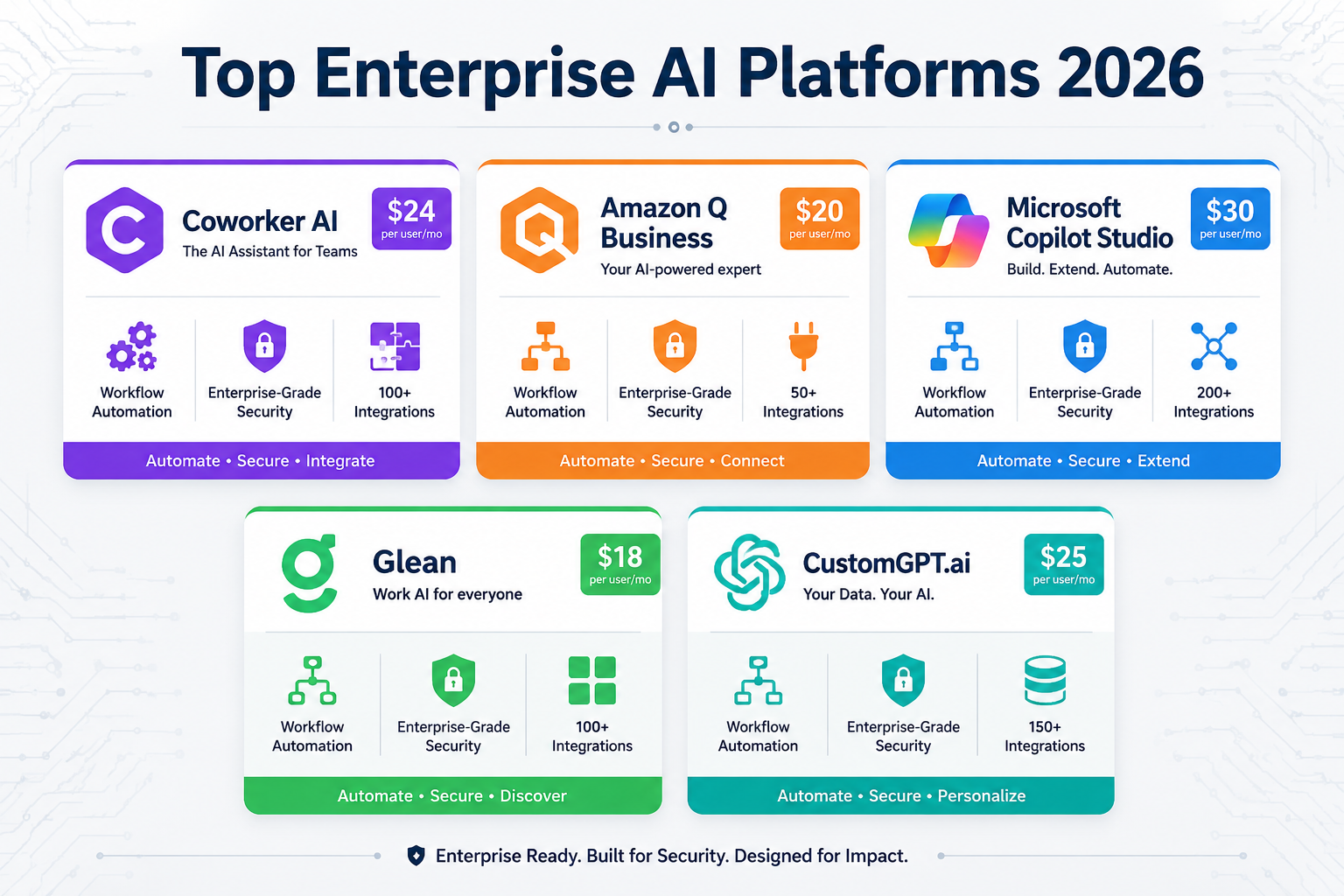
The right platform depends on your stack, your team size, and your primary use case. Here’s a direct breakdown of the leading options in 2026.
Coworker AI — Best for Multi-Tool Orchestration
Choose Coworker AI if your organization runs across Slack, Salesforce, Jira, and Google Workspace and needs a single assistant that can act across all of them. At $30/user/month, it leads the market for cross-app intelligence and workflow execution [1].
Key strengths:
- Deep integrations with major enterprise tools
- Workflow execution (not just retrieval)
- Unified context across platforms
Common mistake: Teams often underestimate the setup time for cross-app permissions. Budget at least two to four weeks for integration configuration before expecting full productivity gains.
Amazon Q Business — Best for AWS-Heavy Teams
At $20/user/month, Amazon Q Business is the most cost-effective fully capable enterprise assistant available in 2026 [1]. It’s built natively into the AWS ecosystem, so if your infrastructure already lives there, the integration overhead is minimal.
Choose Amazon Q Business if your team uses AWS services extensively and cost efficiency is a priority. It’s less compelling if your stack is primarily Microsoft or Google.
Microsoft Copilot Studio — Best for Microsoft 365 Environments
Microsoft Copilot Studio is purpose-built for organizations running Microsoft 365, Teams, SharePoint, and Dynamics [4]. It’s not the most flexible option outside that ecosystem, but inside it, the depth of integration is hard to match.
Edge case: If your organization is mid-migration to Microsoft 365, wait until the migration is stable before deploying Copilot Studio. Partial integrations create inconsistent assistant behavior that erodes user trust quickly.
CustomGPT.ai — Best for Accuracy-Critical Use Cases
CustomGPT.ai is the only no-code enterprise platform built on a “Your Data Only” architecture with proprietary anti-hallucination technology and source citations in every response [3]. This makes it the right choice for internal knowledge management, compliance documentation, and customer support scenarios where a wrong answer carries real consequences.
Choose CustomGPT.ai if your primary use case involves sensitive internal knowledge bases or customer-facing support where accuracy is more important than breadth of integration.
Glean — Best for Enterprise-Scale Search
Glean connects to 100+ enterprise tools and delivers unified knowledge retrieval with AI-powered actions [1]. It’s built for organizations where employees waste significant time searching across fragmented systems.
For teams exploring AI-powered workflow tools more broadly, our review of VoooAI’s multimedia NL2Workflow platform shows how natural language workflow automation is evolving across different contexts.
Kore.ai — Best for Regulated Industries
Kore.ai dominates healthcare, finance, and other compliance-heavy sectors where complex dialogue flows and strict audit requirements are non-negotiable [4]. It’s the established choice when your legal or compliance team has veto power over your AI stack.
Hebbia and Relevance AI — Best for Research and Custom Agents
Hebbia specializes in research and analysis workflows, particularly in finance and legal sectors [5]. Relevance AI is the go-to for teams that want to build custom AI agents and automate specific business processes without extensive engineering resources [5].
Quick Comparison Table
| Platform | Best For | Price (Est.) | Key Strength |
|---|---|---|---|
| Coworker AI | Multi-tool orchestration | $30/user/mo | Cross-app workflow execution |
| Amazon Q Business | AWS-heavy teams | $20/user/mo | Cost efficiency + AWS depth |
| Microsoft Copilot Studio | Microsoft 365 orgs | Varies | M365 ecosystem depth |
| Gemini for Workspace | Google Workspace orgs | Varies | Google ecosystem depth |
| CustomGPT.ai | Accuracy-critical use cases | Custom | Anti-hallucination architecture |
| Glean | Enterprise search | Custom | 100+ tool integrations |
| Kore.ai | Regulated industries | Custom | Compliance + dialogue flows |
| Hebbia | Finance/legal research | Custom | Deep document analysis |
Pricing sourced from [1][3][4]. “Custom” indicates vendor-negotiated enterprise pricing.
How Do Enterprise AI Assistants Actually Integrate with Existing Systems?
Integration is where most enterprise AI deployments succeed or fail. The assistant itself is rarely the problem; the connection to your existing tools is.
Three integration models are common in 2026:
- Native connectors — Pre-built integrations maintained by the vendor (e.g., Coworker AI’s Slack and Salesforce connectors). Fastest to deploy, least flexible.
- API-based integration — Your team connects the assistant to internal systems via APIs. More flexible, requires engineering resources.
- Middleware platforms — Tools like Zapier or Make sit between the assistant and your systems. Good for organizations without dedicated engineering capacity.
For teams using automation middleware, our analysis of NoClick’s AI automation platform covers how no-code automation layers are changing enterprise workflow integration in 2026.
Decision rule: Choose native connectors if speed matters most. Choose API-based integration if you need custom data flows or have proprietary internal systems. Use middleware if your team lacks engineering resources but needs flexibility.
Common mistake: Treating integration as a one-time setup. Enterprise tool stacks change constantly. Build a quarterly review into your deployment plan to catch broken connectors before they become user complaints.
What Does Enterprise AI Deployment Actually Cost in 2026?
The per-seat price is only part of the total cost. Enterprise AI deployments carry several additional cost categories that teams routinely underestimate.
Full cost breakdown:
- Licensing: $20–$30/user/month for fully capable platforms [1]. Multiply by your user count and add 20% for growth.
- Implementation: Integration setup, data preparation, and security configuration typically run 2–4x the first year’s licensing cost for complex deployments.
- Training and change management: User adoption is the most common failure point. Budget for structured onboarding, not just a launch email.
- Ongoing maintenance: Connector updates, prompt tuning, and admin oversight require dedicated time, typically 0.25 to 0.5 FTE for mid-sized deployments.
- Data preparation: If your internal knowledge base is disorganized, the assistant will reflect that. Data cleanup is often the largest hidden cost.
Estimate: A 500-person organization deploying Coworker AI at $30/user/month faces roughly $180,000 in annual licensing plus $100,000–$200,000 in first-year implementation and change management costs. These are estimates based on typical enterprise software deployment patterns, not vendor-published figures.
How to Choose the Right Enterprise AI Assistant for Your Organization
The “best” enterprise AI assistant is the one that fits your existing stack and your team’s actual workflows [1]. Here’s a practical decision framework.
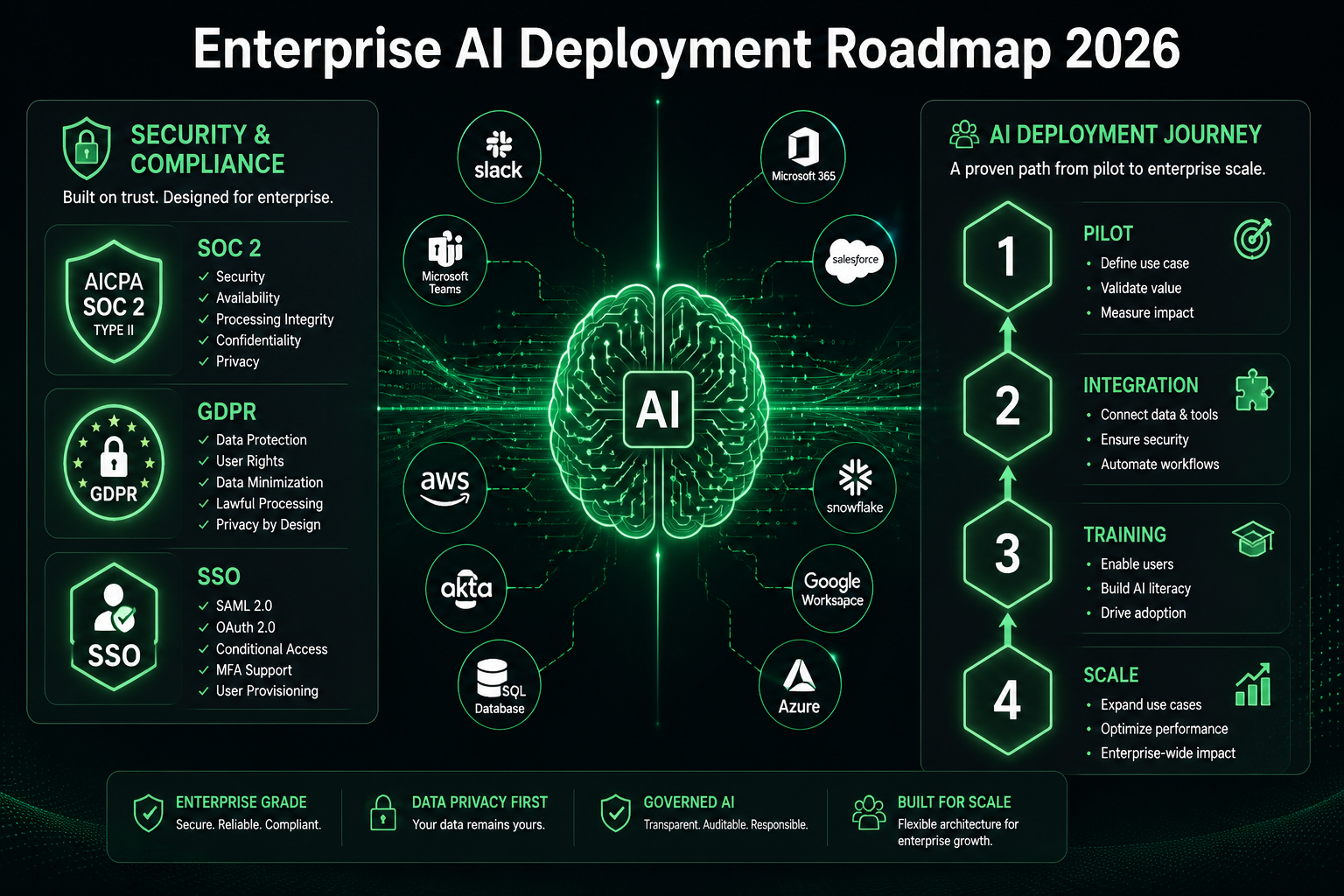
Step-by-step selection process:
- Map your primary use case. Is this for IT/HR service automation, customer support, internal knowledge retrieval, or cross-department workflow execution? Each use case favors different platforms.
- Audit your current tool stack. List every system the assistant needs to connect with. Check each vendor’s native connector list against your stack before shortlisting.
- Define your security requirements. Confirm SOC 2 Type 2, GDPR, and any industry-specific compliance needs (HIPAA for healthcare, SOX for finance) before any vendor conversation.
- Run a pilot with real users. A 30-day pilot with 20–50 actual users in your target department will reveal integration gaps and adoption barriers that no demo will show.
- Measure against a baseline. Define two or three specific metrics before the pilot (e.g., time to answer an internal policy question, tickets resolved without human escalation). Without a baseline, you can’t prove ROI.
Choose X if:
- You’re on AWS → Amazon Q Business
- You’re on Microsoft 365 → Copilot Studio
- You need multi-tool orchestration → Coworker AI
- Accuracy is your top priority → CustomGPT.ai
- You’re in a regulated industry → Kore.ai
- You need pure AI reasoning without tool connections → ChatGPT Enterprise or Claude [1]
For teams evaluating AI tools more broadly, our Bhindi AI review and Kadabra AI review cover emerging AI assistant platforms worth watching in 2026.
What Are the Biggest Mistakes Organizations Make with Enterprise AI Assistants?
Most enterprise AI deployments that underperform share the same handful of mistakes. Knowing them in advance is genuinely useful.
The most common failure patterns:
- Deploying without data preparation. An AI assistant connected to a disorganized knowledge base produces disorganized answers. Clean your data first.
- Skipping the pilot phase. Rolling out to 500 users before validating with 50 creates company-wide frustration and is very hard to recover from.
- Treating it as an IT project, not a people project. The technology is rarely the problem. User adoption is. Involve department leads from day one.
- Ignoring permission mapping. Failing to configure access controls properly means users either get answers they shouldn’t, or get blocked from answers they need. Both erode trust.
- No defined success metrics. Without clear KPIs, “the AI isn’t working” becomes the default complaint with no way to diagnose or fix it.
For context on how AI tools are being evaluated across different business functions in 2026, our Gumloop review examines how workflow automation platforms are being assessed for enterprise readiness.
How Are Enterprise AI Assistants Evolving Beyond Simple Chat in 2026?
The most significant shift in AI Virtual Assistants: Enterprise Solutions 2026 is the move from retrieval to execution. Tools that only answered questions are being replaced by tools that take action [10].
Key capability shifts in 2026:
- Agentic workflows: Assistants now chain multiple actions together autonomously. For example, a user asks about a customer complaint, and the assistant retrieves the CRM record, drafts a response, and creates a follow-up task in Jira, all in one interaction.
- Proactive assistance: Rather than waiting for queries, advanced platforms now surface relevant information based on context (e.g., flagging a contract renewal before a sales call).
- Multi-modal input: Enterprise assistants increasingly accept voice, images, and documents as input, not just text.
- Custom agent building: Platforms like Relevance AI let non-technical teams build specialized AI agents for specific business processes without writing code [5].
This evolution means the evaluation criteria for enterprise AI assistants in 2026 must include action capability, not just answer quality. A tool that gives great answers but can’t update a system is already falling behind.
FAQ: AI Virtual Assistants Enterprise Solutions 2026
Q: What’s the difference between an enterprise AI assistant and a consumer chatbot?
Enterprise AI assistants connect to your company’s data and systems, enforce permission-based access controls, and can take action across tools. Consumer chatbots use only their training data and have no access to your internal systems [1].
Q: Which enterprise AI assistant is cheapest in 2026?
Amazon Q Business at $20/user/month is the most cost-effective fully capable enterprise option, particularly for AWS-dependent organizations [1].
Q: Is ChatGPT Enterprise a good choice for businesses?
ChatGPT Enterprise is strong for pure AI reasoning and writing tasks but lacks deep tool integration. It’s best for organizations that don’t need the assistant to take action across systems [1].
Q: How long does enterprise AI assistant deployment take?
A basic deployment with native connectors typically takes four to eight weeks. Complex integrations with custom data sources and permission mapping can take three to six months.
Q: What security certifications should I require from an enterprise AI vendor?
At minimum: SOC 2 Type 2, GDPR compliance, and SSO/SAML support. Regulated industries should also require HIPAA (healthcare) or SOX-relevant controls (finance) [1].
Q: Can enterprise AI assistants work across different departments?
Yes, but cross-department deployments require careful permission mapping. Each department’s data should only be accessible to authorized users, even within the same organization.
Q: What is Glean used for in enterprise settings?
Glean is used for unified enterprise search across 100+ tools. It’s designed for large organizations where employees waste time searching fragmented systems for information [1].
Q: How do I measure ROI from an enterprise AI assistant?
Track specific metrics before and after deployment: time to answer internal questions, support ticket volume, time spent on repetitive tasks, and employee satisfaction scores. Without a baseline, ROI measurement is guesswork.
Q: Is CustomGPT.ai suitable for customer-facing support?
Yes. Its “Your Data Only” architecture and anti-hallucination technology make it particularly well-suited for customer support scenarios where accuracy is critical [3].
Q: What’s the biggest risk in enterprise AI assistant deployment?
Poor user adoption, usually caused by inadequate change management, unclear use cases, or an assistant that gives inconsistent answers due to poor data quality.
Q: Are there AI assistants built specifically for regulated industries?
Kore.ai is the established choice for regulated industries requiring complex compliance controls, audit trails, and specialized dialogue flows [4].
Q: How do enterprise AI assistants handle data privacy?
Reputable enterprise platforms process your data within defined security boundaries, do not use your data to train public models, and provide audit logs of all interactions. Always verify these commitments contractually before signing.
Conclusion: Choosing and Deploying AI Virtual Assistants in 2026
The enterprise AI assistant market in 2026 has matured past the hype phase. The tools are real, the ROI is measurable, and the failure modes are well-documented. What separates successful deployments from expensive disappointments is almost never the technology itself.
Actionable next steps:
- Define your primary use case first. Don’t shop for platforms until you know whether you need knowledge retrieval, workflow automation, customer support, or cross-app orchestration.
- Audit your stack and security requirements before any vendor conversation. Know your compliance needs and your integration list.
- Use the decision framework above to shortlist two or three platforms that fit your ecosystem.
- Run a structured 30-day pilot with real users and real workflows before committing to a full deployment.
- Set measurable KPIs before the pilot starts. Time saved, tickets deflected, and user satisfaction scores are all trackable.
- Invest in change management. The assistant is the easy part. Getting 500 people to actually use it consistently is the hard part.
The organizations getting the most value from AI Virtual Assistants: Enterprise Solutions 2026 are the ones treating deployment as a business transformation project, not a software installation. Start small, measure carefully, and scale what works.
References
[1] Best Enterprise AI Assistant 2026 – https://coworker.ai/blog/best-enterprise-ai-assistant-2026
[2] Enterprise AI Solutions – https://reclaim.ai/blog/enterprise-ai-solutions
[3] Best Enterprise AI Chatbot Platforms In 2026 Compared Use Cases – https://www.chitika.com/best-enterprise-ai-chatbot-platforms-in-2026-compared-use-cases/
[4] Best AI Chatbots For Enterprise Businesses In 2026 – https://www.sortresume.ai/best-ai-chatbots-for-enterprise-businesses-in-2026/
[5] Best AI Agents For Enterprise 2026 – https://www.console.com/blog/best-ai-agents-for-enterprise-2026/
[10] AI & Automation Tools – https://www.youtube.com/watch?v=JgYeQTVzFOI