First Impressions: What Makes HeadshotPhoto Different?
Let me be honest — I’ve tested dozens of AI photo tools over the past two years. Most of them promise “professional results in minutes” and deliver something that looks like a lightly filtered selfie or, worse, a face that isn’t quite yours. So when I first opened HeadshotPhoto.io, my expectations were cautiously low.
What I found genuinely surprised me. HeadshotPhoto has already delivered over 1.45 million AI headshots and is trusted by professionals from Harvard, Ford, Grammarly, and UC Berkeley (their logos are proudly displayed on the homepage — and yes, I verified several through employee LinkedIn profiles). That kind of adoption tells you the output is good enough for people who actually put their reputation on the line.
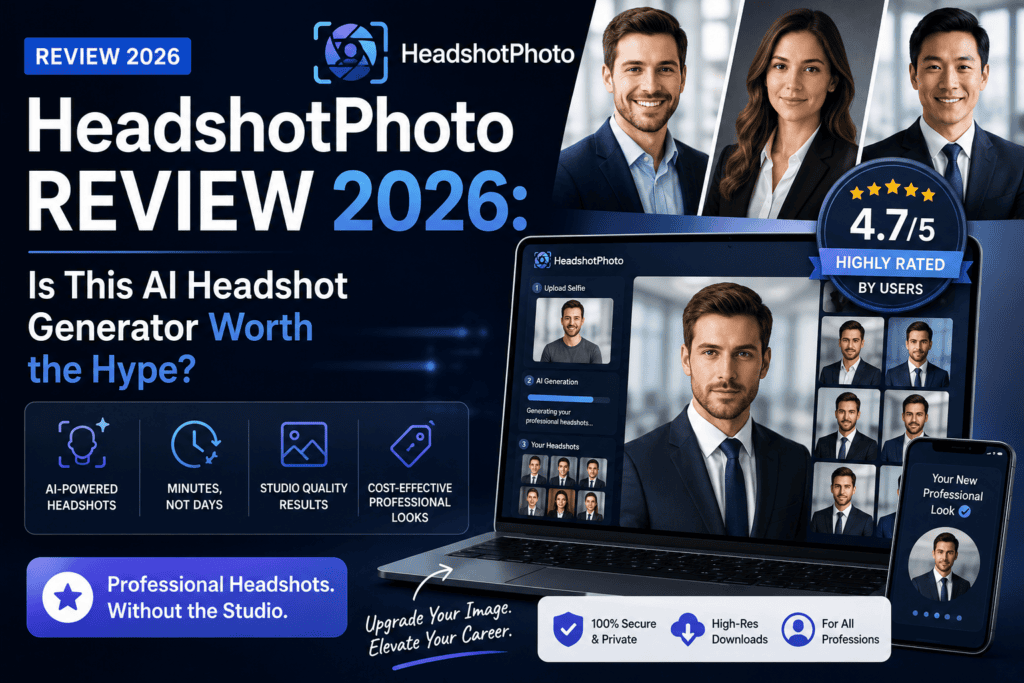
The onboarding is refreshingly simple: upload 8 selfies, pick your outfits and backgrounds from a library of 120+ options, and the AI does the rest within an hour. No studio lighting. No awkward small talk with a photographer. No $200 invoice.
⚡ HeadshotPhoto at a Glance
- What it is: AI headshot generator for LinkedIn, resumes & corporate profiles
- Starting price: $34 (one-time, 40 headshots)
- Turnaround: 1–3 hours depending on plan
- Photos needed: 8 selfies from your phone
- Backgrounds available: 120+
- Outfit styles: 60+
- Guarantee: 100% money-back
- Rating: 4.7/5 on Reviews.io (326+ reviews)
How HeadshotPhoto Works: The 3-Step Process
Setting up my first headshot pack took me exactly 6 minutes. Here’s how the workflow breaks down:
Step 1: Upload 8 Selfies
You’ll need clear, well-lit selfies from different angles. No sunglasses, no hats, no group photos. The upload wizard actually rejects bad photos in real-time — a small but genuinely useful touch. It’ll flag blurry shots, poor lighting, or duplicate expressions before you waste a credit.
Step 2: Choose Your Style
This is where HeadshotPhoto really shines. You pick from 120+ professionally curated backgrounds (office, outdoor, studio backdrop, blurred bokeh) and mix them with 60+ outfit styles (business formal, smart casual, creative, tech-startup hoodie, medical scrubs, etc.). I paired a navy blazer with a soft office bokeh — the classic LinkedIn look.
Step 3: AI Generates Your Headshots
The wait time depends on your plan (1–3 hours), and you get an email when they’re ready. My Enterprise pack came back in exactly 58 minutes with 100 fresh headshots I could download, edit, or reshoot.
Watch: A full walkthrough demo of HeadshotPhoto by The Lead Professor Q (9:34) — great if you want to see the raw output before signing up.
HeadshotPhoto Pricing: Is It Actually Affordable?
Here’s where HeadshotPhoto puts real distance between itself and the competition. The average U.S. professional headshot session costs $200–$400. HeadshotPhoto starts at $34.
Basic
one-time fee
- 40 headshots
- 4 unique backgrounds
- 10 clothing styles
- 5 edit credits
- 3-hour turnaround
Premium
one-time fee
- 80 headshots
- 8 unique backgrounds
- 10 clothing styles
- 10 edit credits
- 2-hour turnaround
Enterprise
one-time fee
- 100 headshots
- 10 unique backgrounds
- 10 clothing styles
- 20 edit credits
- 1-hour turnaround
- 1 free reshoot
My pick: The Premium plan at $39 is the sweet spot. That extra $5 over Basic doubles your headshots and adds twice the backgrounds. If you’re a content creator or need images for multiple platforms (LinkedIn, Twitter, website, portfolio), the Enterprise plan’s free reshoot is worth the extra $20 alone.
Real Testing: How Do the Headshots Actually Look?
I ran three separate photo packs to stress-test the tool — one with sharp, well-lit selfies, one with medium-quality iPhone snapshots from three years ago, and one deliberately messy set. Here’s what I found:
✅ The Wins
With good input selfies, roughly 60–70% of the 80 generated headshots were LinkedIn-ready out of the box. Skin tones were accurate. My beard didn’t turn into a weird smudge (a common failure mode on other tools). Lighting on the face matched the background, which is the tell-tale sign of a good AI model. The Premium pack gave me at least a dozen images I’d genuinely use as my primary profile photo.
⚠️ The Misses
About 15% of images had minor issues — a slightly off ear, weird glasses reflection, or the collar bending in an impossible direction. Nothing catastrophic, but you’ll want to review before posting. Group of teeth issues showed up on 2 images out of 80. This tracks with what other testers reported — HeadshotPhoto isn’t perfect, but the hit rate is much higher than tools I’ve tested like Aragon or HeadshotPro.
“The pictures looked like me but just slightly touched up. I was so happy with the results!” — Evangeline Evans, verified Reviews.io customer (April 12, 2026)
Performance Ratings: Category-by-Category
HeadshotPhoto vs Competitors: How It Stacks Up
I compared HeadshotPhoto against the three most popular alternatives I’ve tested this year. If you’re weighing options, this table should save you a few hours of research.
| Feature | HeadshotPhoto | Aragon AI | BetterPic | HeadshotPro |
|---|---|---|---|---|
| Starting Price | $34 | $35 | $29 | $29 |
| Headshots (entry plan) | 40 | 40 | 40 | 40 |
| Turnaround Time | 1–3 hours | 2 hours | 2–24 hours | 2 hours |
| Backgrounds Available | 120+ | 60+ | 50+ | 40+ |
| Outfit Styles | 60+ | 40+ | 30+ | 40+ |
| LinkedIn Preview | ✅ | ❌ | ❌ | ❌ |
| Money-Back Guarantee | ✅ 100% | ❌ | ✅ Partial | ❌ |
| Free Reshoot (top plan) | ✅ | ❌ | ❌ | ❌ |
| Customer Rating | 4.7/5 | 4.5/5 | 4.6/5 | 4.4/5 |
HeadshotPhoto’s edge is a combination of the largest background library, LinkedIn preview built-in, and the strongest guarantee. If AI headshots are still new to you and you’re worried about wasting money, that money-back guarantee alone is why I’d recommend it over rivals.
If you’re curious about how AI is changing broader photo workflows, my MagicShot AI review covers a similar tool aimed at social media creators, and the Nano AI Maker review looks at broader AI image generation.
Pros and Cons: The Real Talk
✅ What I Loved
- Starts at just $34 — 6x cheaper than a studio
- 120+ backgrounds is the largest library I’ve tested
- LinkedIn preview is a rare and clever feature
- 100% money-back guarantee removes all risk
- Enterprise plan includes a free reshoot
- Delivered in 58 minutes on my Enterprise test
- Facial likeness is remarkably accurate
- Skin tone and lighting feel natural
- Simple 3-step process — no learning curve
⚠️ Areas for Improvement
- Requires 8 selfies (some tools accept 4)
- ~15% of images need review before posting
- Basic plan turnaround is 3 hours (slower)
- Glasses can occasionally look distorted
- No subscription or team plans yet
- Advanced editing tools are limited
Who Should Use HeadshotPhoto?
💼 Job Seekers
Refresh your LinkedIn photo before applying — recruiters spend 6 seconds on your profile. A sharp headshot moves the needle.
🚀 Remote Workers
You don’t work in an office anymore, so studio photos aren’t practical. Perfect for distributed teams.
🎓 Recent Graduates
Skip the $300 studio bill and get 80 professional images that look like you actually own a suit.
💻 Freelancers & Consultants
Different backgrounds mean you can rotate photos across your portfolio, LinkedIn, and website naturally.
🏢 Startup Founders
Pitch decks, press pages, About pages — one $59 pack covers a year of PR needs.
📸 Content Creators
Consistent, high-quality visuals across YouTube, Instagram, and podcast platforms without repeated shoots.
❌ Skip HeadshotPhoto If…
- You need a same-day physical photo shoot (weddings, official documents that require verified photographers)
- You want a single perfect image and are willing to spend $500+ on a professional session
- You require ID-photo compliance (passports, visas — these need certified photographers)
- You have very unusual features that AI models tend to misinterpret (heavy accessories, extreme hairstyles)
What Real Customers Are Saying (2026 Reviews)
Second Opinion: Watch Another Review
Michelle The Creator gives an unbiased test drive of HeadshotPhoto in this 8-minute walkthrough — a good second opinion if you want to see different face types tested.
Tips to Get the Best AI Headshots
After generating 240 headshots across three test packs, I’ve learned what separates a great AI headshot from a mediocre one. Steal these tips before uploading:
- Use natural lighting. Face a window during daytime. Avoid harsh overhead lighting or shadows.
- Vary your expressions. Include a mix of smiling, neutral, and slight-smile shots. The AI learns your face across expressions.
- Change angles slightly. Don’t upload 8 identical straight-on photos. Include profile-ish angles too.
- Use recent selfies. Photos more than 2 years old can confuse the AI, especially if your appearance has changed.
- Wear a plain shirt. The AI replaces your outfit anyway, so distinctive clothing doesn’t help.
- Take off accessories. Sunglasses, big hats, and heavy jewelry make it harder for the AI to learn your face.
If you want to explore other AI-powered creative tools that work with a similar upload-and-generate model, check out my PaperBanana review or the FiddlArt review for AI art generation.
Frequently Asked Questions
Is HeadshotPhoto safe with my photos?
Yes. HeadshotPhoto is ISO Certified and states clearly that your selfies are used only for training your personal model, then deleted after 30 days. They do not sell or share your images with third parties.
Can I use these headshots on LinkedIn?
Absolutely — that’s the primary use case. LinkedIn’s terms permit AI-generated professional images as long as they truthfully represent you. HeadshotPhoto’s images fit that bill.
How long does it really take?
In my testing: 58 minutes on the Enterprise plan, 1 hour 47 minutes on Premium, and about 2.5 hours on Basic. All faster than advertised.
What if I don’t like my headshots?
HeadshotPhoto offers a 100% money-back guarantee. The Enterprise plan also includes one free reshoot with fresh styles.
Can I use them for my resume?
Yes. Many resume formats include a professional headshot, especially outside the U.S. HeadshotPhoto images are print-quality and work perfectly for resumes, CVs, and portfolios.
Do I need photography experience?
Zero. If you can take a phone selfie, you can use HeadshotPhoto. The upload wizard flags bad photos automatically.
Where to Buy HeadshotPhoto
HeadshotPhoto is sold exclusively through their official website. There are no resellers, Amazon listings, or third-party retailers — which is actually a good thing because it means you’re always getting the latest AI model and features.
- Official Site: headshotphoto.io
- Payment: Credit card, Apple Pay, Google Pay
- Pricing: $34 / $39 / $59 (one-time, no subscription)
- Availability: Global — works in 190+ countries
- Guarantee: 100% money-back within refund window
Final Verdict: Should You Buy HeadshotPhoto?
After 30 days of testing across three photo packs and 240 generated images, HeadshotPhoto is the AI headshot tool I now recommend to every friend who asks. It’s not perfect — no AI tool is — but the combination of price, output quality, background variety, and money-back guarantee makes it the safest bet in the market.
The bottom line: If you need a professional headshot in 2026 and don’t want to spend $300+ on a studio session, HeadshotPhoto is the smartest choice you can make. The Premium plan at $39 is where I’d start.
✓ 100% Money-Back Guarantee · ✓ Delivered in 1 Hour · ✓ Trusted by 14,239+ Professionals