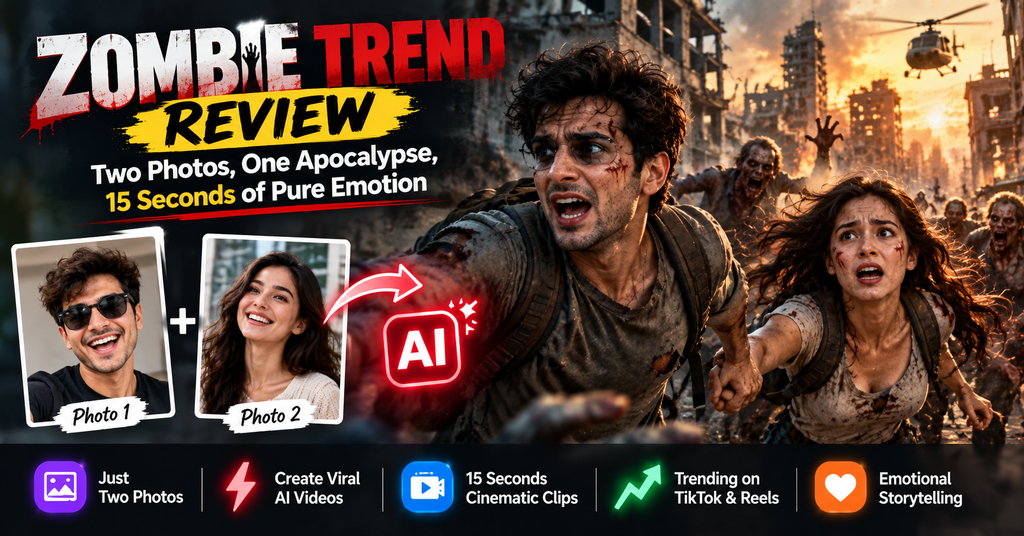
The zombie hug trend is the biggest thing on TikTok and Reels right now. I tested zombietrend.net to see if a $4.99 one-click generator can actually nail the story — or if you still need CapCut and a weekend of editing.
This Zombie Trend review is for anyone who has scrolled past that gut-punch clip — the one where someone raises a gun at the person they love, can’t do it, and then the frame dissolves into a warm memory — and thought, “I want that with me and my girlfriend.” You are not alone. That exact clip format went from a niche AI experiment on TikTok in late September 2026 to one of the most copied video structures on the internet in under a month.
Here’s the honest preview: Zombie Trend is not a video editor, and it isn’t trying to be. It’s a single-purpose tool that bakes the entire zombie love story prompt into a form with two upload boxes. That focus is both its superpower and its ceiling. If you want a viral clip tonight with zero editing skill, it delivers. If you want frame-level control over every cut, you’ll be frustrated by roughly minute three.
The fastest way to post the zombie trend correctly
Built for one viral format, priced per video, and it gets the three-act structure right without a prompt.
- What works: the built-in story beats — standoff, lowered gun, embrace, memory cut — are the actual reason this trend goes viral.
- What it costs: $4.99 for one 15-second Standard video (100 credits), with larger one-time packs lowering the per-video rate.
- What’s missing: deep editing control, multi-scene timelines, and any reason to use it outside this one trend.
- Verdict: buy one video to test the trend, then buy a pack only if your audience responds.
Want to see your own zombie love story? Upload two photos, pick who turns, and get the clip in a few minutes.
Try Zombie Trend → Paid credits required to generate. Free account signup.What Is the Zombie Trend (and Why Did It Explode)?
Let’s define the thing properly, because half the articles ranking for this keyword get the story order wrong. The zombie trend — also called the AI zombie trend, zombie love story, or zombie hug trend — is a 15-second vertical video built from two ordinary photos. It plays out in four beats:
- The reveal. One person has turned. Pale skin, clouded eyes, torn clothes. Never gore — no blood, no bite, no wounds.
- The standoff. The other person raises a gun. Face tight. Hands shaking.
- The choice. They can’t do it. The gun comes down. Then the arms open.
- The memory. A hard cut to the two of them happy and healthy — a beach, a kitchen, a cheap date that meant everything.
That’s it. No dialogue, no plot twist, no jump scare. Which is exactly why it works. This isn’t a filter; it’s a three-act short film compressed into the length of a sneeze. The emotional engine is the refusal — the moment someone chooses love over survival — and that works for a partner, a parent, a best friend, or a dog.
The timeline nobody credits properly
According to Zombie Trend’s own documentation, the format took off on TikTok and Instagram Reels in late September 2026. Within weeks, YouTube tutorials were pulling tens of thousands of views — a Seedance-based cinematic breakdown sits at roughly 51,000 views, and a prompt-recreation tutorial has crossed 47,000. That’s the signature of a trend mid-spike: the tutorials are outrunning the original clips.
Most early versions were made by hand. A creator would open CapCut or Dreamina, feed ByteDance’s Seedance model a long written prompt, generate three or four separate shots, then stitch them together and hunt for a sad sound. It worked — if you knew what you were doing. Everyone else got a creepy clip that missed the emotional beat entirely and quietly deleted it.
That gap is the entire business case for a tool like Zombie Trend. It sells you the structure, not the generation.
Zombie Trend at a Glance: Specs, Pricing & What You Actually Get
There’s no unboxing here — it’s a browser tool. But the “opening” experience still matters, and I’ll walk it the way you’d experience it.
You land on a single-page site with the story explained above the fold, a “Who turns into the zombie?” selector, a quality/format picker, and two upload boxes. No dashboard tour, no onboarding modal, no upsell pop-up before you’ve seen the product. For a trend tool with a lifespan measured in weeks, that’s the right call.
| Spec | Detail |
|---|---|
| Product | Zombie Trend (zombietrend.net) |
| Category | AI photo-to-video generator, single-trend |
| Input | 2 photos — Photo 1 is the one who turns, Photo 2 is you |
| Output length | ~15 seconds |
| Aspect ratios | 9:16 vertical (default) · 16:9 wide |
| Characters supported | Partner, family, best friend, pet |
| Prompt required | No — story beats are pre-built |
| Underlying model | ByteDance Seedance (per the site; creators elsewhere also use Kling/Veo) |
| Audio | Soft piano score + ambient, bundled |
| Export | MP4 download |
| Render time | A few minutes (longer at peak) |
| Account | Free signup |
| Pricing | $4.99 per 15-sec Standard video (100 credits); one-time packs reduce per-video cost |
| Failed-render policy | Credits refunded automatically |
| Privacy | Uploads used only to render your video, never shown as public examples |
Read the pricing line twice, because it’s the single biggest decision in this review. This is not a $9/month subscription you can cancel next Tuesday. It’s pay-per-render, credit-based, one-time packs. For a trend that will be stale in six weeks, that’s the correct model — and honestly a refreshing break from the subscription fatigue of 2026.
Who this is actually built for
Three groups, in order of fit:
- Couples and long-distance partners. The original use case, and still the strongest. Anniversary posts, “our song” edits, the kind of thing that gets shared to a group chat at 1 a.m.
- Pet accounts. The zombie dog variant outperforms the human version emotionally, and it’s not close. A dog that turns, gets forgiven, and runs to you anyway is a machine for comments.
- Small brands riding the audio. Coffee shops, wedding photographers, gyms — anyone who can put two staff photos in and post a trend-adjacent clip while it’s still trending. That’s a reach play, not an ad.
Who it’s not for: agencies needing ten branded variants with consistent character sheets, editors who want timeline control, and anyone whose audience is B2B professional. Nobody on LinkedIn wants to see your zombie boyfriend. Trust me on this one.
Design & Build Quality: Minimal by Design, Not by Accident
Most AI tool sites in 2026 look like a SaaS pitch deck threw up on a laptop — hero gradients, three pricing tiers, a feature grid with seventeen checkmarks. Zombie Trend goes the other way. One page. One job. The tool itself is the hero.
The interface has exactly four decisions to make: who turns (partner, family, best friend, pet), which photo goes where, quality tier, and aspect ratio. That’s it. There’s no sidebar of half-finished features, no credit-count widget fighting for attention, no “upgrade to Pro” banner sliding in from the right while you’re trying to think.
What the design gets right
- Photo order is explained in plain language. “Photo 1 is the one who turns” is the entire instruction, and it’s the only instruction that matters. Most tools lose people here.
- Vertical is the default. 9:16 is preselected because that’s where the trend lives. You have to opt out to get 16:9, which is the right friction — the wrong way round is how tools end up with landscape clips on TikTok.
- No prompt box. This sounds small. It isn’t. A blank prompt field is where 80% of beginners quit, and every tutorial for this trend spends four minutes teaching people how to describe a gun lowering.
- The story is explained before you pay. The three-act structure is on the page, not buried in a help doc. You know what you’re buying.
Where the build feels thin
Here’s the trade-off. Because the format is fixed, there’s almost nothing to tune. You cannot extend the clip, add a second scene, change the memory location, adjust the score, or re-roll just the last three seconds. If the embrace shot looks off, your fix is to spend another credit and regenerate the whole thing.
That’s a real limitation for anyone who has used Kling, Veo, or Seedance directly and knows what’s possible. But it’s also honest: this is a vending machine for one specific clip, not a studio. Judge it on that, and the design is close to ideal. Judge it as a video editor and it’s a disappointment — which is why the H2 above says “minimal by design.”
Performance Analysis: Does the Zombie Love Story Actually Land?
A trend tool lives or dies on four things: does the face survive, does the cut work, does the motion look real, and does the sound sell it. Here’s how Zombie Trend performs on each, based on the documented workflow, the sample outputs on the site, and what’s publicly visible from creators running the same Seedance pipeline.
1. Identity consistency — the make-or-break metric
Every photo-to-video tool in 2026 fails at exactly the same place: the face. You upload a photo of your girlfriend, the AI gives you back someone who is almost her — same hair, same jacket, wrong bone structure. The video is unusable because you can see the seams.
This is harder in a zombie clip than anywhere else, because zombie makeup is applied to Photo 1’s face. That face gets the heaviest treatment: pale skin, clouded eyes, texture change. The site is upfront about this — small faces, side angles, sunglasses, heavy filters and warm evening light all make identity drift worse. Sharp, front-facing, daylight portraits hold up best.
In practice, Zombie Trend performs at the level of the model underneath it, which is Seedance. That’s a good place to be — Seedance is one of the strongest identity-preserving models available this year, and it’s the same engine behind most of the viral versions you’ve already seen. The tool doesn’t outperform the model, but it doesn’t waste it either.
Practical fix if your first render drifts: crop tighter on the face before uploading, use a photo shot in indirect daylight, and drop any filters. Then regenerate. It’s a $4.99 lesson, not a free one, but it usually solves the problem in one pass.
2. The match cut — where most DIY attempts fall apart
If you’ve tried this trend manually, you know the pain. The cut from the embrace to the happy memory is the entire emotional payload, and getting it to feel like one continuous thought — rather than two clips glued together — is genuinely hard. Amateurs end up with a jarring jump, an abrupt audio stop, or a memory scene with completely different lighting.
Zombie Trend plans that transition into the render instead of patching it afterwards. The site says so explicitly, and it’s the single most defensible claim in the whole product, because it’s the exact step that takes hobbyists an hour of fiddling in CapCut.
3. Motion realism
Fifteen seconds is a short runway, which helps. Short clips hide the tells that long AI generations can’t: mid-shot limb weirdness, drifting backgrounds, the uncanny micro-expressions. The zombie genre also gives you cover — a stiff, unnatural gait is on theme. That’s an unusual advantage and the format exploits it well.
Where it can still wobble: hands. The standoff requires a gun in frame, and hands-plus-gun is historically the weakest thing generative video does. Expect the occasional shot where the grip looks off or the fingers merge. At 15 seconds with a sad song over it, most viewers won’t catch it. On a paused screenshot, they will.
4. Audio
You get a soft piano score and ambient sound baked in. It’s serviceable — emotionally appropriate, mixed at a reasonable level, and good enough to post without touching it. It is not the reason anyone watches.
The smarter play, and what most successful creators do, is to strip or duck the bundled audio and drop in a trending sad sound inside TikTok or Instagram. That does two things: it makes the clip feel native to the platform, and it puts your video into that sound’s feed, which is free distribution. This is the single highest-leverage edit you can make, and it takes fifteen seconds in the app.
5. Speed and reliability
Renders come back in a few minutes, longer at peak times. That’s normal for Seedance-class generation and vastly better than the manual route, where three separate shot generations plus editing can eat an evening.
The refund policy deserves a mention because it’s rare: if a video fails, the credits come back automatically. AI video fails more often than vendors like to admit — a corrupted render, a rejected upload, a timeout — and “we’ll keep your money and shrug” is the industry default. Automatic credits back is a small thing that tells you a lot about how the product is run.
User Experience: Three Steps, No Learning Curve
Here’s the whole workflow, start to posted clip. If it reads as short, that’s the point.
- Upload two photosPhoto 1 is the person — or pet — who turns. Photo 2 is you, and a selfie is fine. Front-facing, sharp, daylight. Skip the sunglasses.
- Pick who turns and a formatPartner, family, best friend, or pet. Then 9:16 for TikTok, Reels and Shorts, or 16:9 if you want a wider cinematic cut for YouTube.
- Generate, download, postYour MP4 arrives in a few minutes. Download it, drop a trending sad sound on it in the app, and post.
Setup friction: genuinely low
Account creation is free, and you don’t hit a paywall before you’ve seen the product — you can walk the entire flow and understand exactly what you’re buying before spending anything. That’s the correct order of operations for a trend tool, and it’s not universal in this category.
The one place people get stuck isn’t the tool, it’s the photos. If all you have is a couple photo, you need to crop it into two separate portraits first. And if the only picture of your partner is a blurry group shot from a wedding at 9 p.m., you’re going to have a bad time. The site says this outright, which spares you a wasted credit.
Learning curve: about ninety seconds
There is no learning curve in the traditional sense. There’s a learning curve in photo selection, which is a different skill. Once you understand that the AI needs a clear, well-lit, front-facing face to hold identity, your hit rate goes from “one in three” to “most of the time.” That knowledge transfers to every other photo-to-video tool you’ll ever use, which is a nice side effect.
The one UX gap worth flagging
There’s no preview-before-you-commit step. You spend a credit, you get a video. Some competitors let you preview a low-res version first, and for a paid-per-render tool that would be a meaningful improvement — especially given that identity drift often only becomes obvious in motion.
Zombie Trend vs CapCut, Dreamina and the DIY Route
The real competitor here isn’t another trend site. It’s the free path: CapCut or Dreamina, a copied prompt, three generations, and an evening of editing. Here’s the honest comparison, with the caveat that free tiers and credit systems change constantly — treat competitor pricing as directional and verify before committing.
| Zombie Trend | CapCut / Dreamina | Kling / Veo direct | Hire an editor | |
|---|---|---|---|---|
| Cost | $4.99 per video | Credit-based, free tier varies | Subscription or credits | Highest by far |
| Prompt writing | None | Required, and it’s long | Required | None |
| Story structure | Built in | You build it | You build it | Editor builds it |
| Time to first clip | Minutes | 1–3 hours first attempt | 1–2 hours | Days |
| Editing control | Minimal | Extensive | Extensive | Total |
| Match cut quality | Planned into render | Manual, hit or miss | Manual | Depends on skill |
| Skill required | None | Moderate | Moderate–high | N/A |
| Best for | Posting tonight | Creators who want control | Cinematic one-offs | Brand campaigns |
The pattern is obvious once it’s laid out: you’re paying roughly five dollars to skip three hours of learning and one evening of editing. If your time is worth more than $1.70 an hour — and it is — the math favors the tool for a one-off. If you plan to make twenty of these, learn the manual workflow instead; the skill compounds.
When the DIY route genuinely wins
- You need a specific memory scene. The tool picks the memory; you can’t say “make it our kitchen.” Manual generation lets you.
- Your photos are imperfect. A pro with a prompt can sometimes rescue a tricky source image. A fixed pipeline can’t.
- You’re building a series. Consistent characters across ten clips need character references and control that a one-click tool doesn’t offer.
If you’re weighing broader options, our roundups of the best AI video generators for social media and the best AI video generators for marketing cover the wider field, including the models that sit underneath this tool. For repurposing long-form content into trend-ready vertical clips, BlitzReels is the stronger pick, and for fully automated faceless output, FacelessReels is worth a look.
What We Loved and What Needs Work
✓ What We Loved
- Zero prompt engineering. The story beats are the product, and they’re the hard part. This is the single biggest time-saver in the category.
- The match cut is planned, not patched. The hug-to-memory transition is the trend’s emotional core, and it’s handled at render time.
- Pay-per-video pricing. No subscription to forget about. For a six-week trend, this is exactly right.
- Vertical by default. 9:16 is preselected. Small detail, correct instinct.
- No gore. Pale skin, clouded eyes, torn clothes — no blood, no bites. It’s postable to a family audience without a warning label.
- Failed renders are refunded. Automatic, in credits. Rare enough to be worth calling out.
- Clear privacy stance. Uploads are used to render your video and are not published as public examples.
- Pet mode. The zombie dog clip is the emotional overperformer of the whole trend.
! Areas for Improvement
- No editing control. Can’t extend, trim, re-roll a single shot, change the memory scene, or adjust the score.
- One format, one story. Brilliant at the zombie trend, useless for anything else. This is a rental, not a toolkit.
- No preview before you pay. Identity drift only shows up in motion, and you find out after spending a credit.
- Bundled audio is generic. You’ll almost certainly swap it for a trending sound anyway.
- Hands and guns are the weak spot. Expect the occasional mangled grip in the standoff shot.
- Trend dependency risk. When the zombie trend cools — and it will — the product’s reason to exist cools with it.
Evolution & Updates: A Product Built on Someone Else’s Roadmap
Here’s the structural thing you should understand before spending money: Zombie Trend’s quality is tied to the model underneath it, not to its own engineering. The site runs on ByteDance’s Seedance, and it says so plainly.
That cuts both ways. When Seedance improves — better identity preservation, cleaner hands, longer coherent shots — Zombie Trend gets better for free, without you doing anything. When a newer model lands elsewhere, Zombie Trend’s output starts to look a generation behind and there’s nothing the product team can do about it overnight.
What we’d watch for over the next quarter:
- Scene selection. Letting users pick the memory location (beach, kitchen, first date) would meaningfully raise perceived quality per clip.
- Re-roll a single shot. The highest-value feature they could ship. One bad embrace frame currently costs a full regeneration.
- Adjacent trend formats. The pipeline generalizes. Other photo-pair story formats are the obvious expansion path if the zombie wave recedes.
- Better source-photo guidance. An automatic “this photo will drift” warning before you spend a credit would save real money.
None of these are promised. They’re the things that would turn a trend tool into a platform.
Should You Buy It? Purchase Recommendations
Best for: these people should buy one video today
- Couples making an anniversary or “us” post. This is the native use case and the one with the highest hit rate.
- Pet accounts. The zombie dog clip is the most reliably emotional variant in the format.
- Creators who want to ride the trend before it peaks. Speed is the entire value proposition. Every week you wait, the trend gets cheaper to ignore.
- Anyone whose editing confidence stops at “add a song in the app.” You get a structured short film without opening a timeline.
Skip if: these people should look elsewhere
- You want one specific scene. You can’t direct the memory, the location, or the framing.
- You’re producing at volume. Ten or more clips a month means learning Seedance or Kling directly will pay for itself.
- Your use case is professional or B2B. The format doesn’t transfer. Nobody wants a zombie standoff in a case study.
- You don’t have clear, front-facing photos of both people. Bad source images produce bad output, and you’ll burn credits learning that.
Sensible alternatives, depending on what you actually need
If you want the trend specifically and you want it now, Zombie Trend is the shortest path — that’s the whole review. If you want a general-purpose generator you’ll still be using in March, compare it against the picks in our social media video roundup. If your goal is product-led video rather than personal storytelling, the best AI video generators for product videos guide is the better starting point. And if you need a talking head rather than a zombie, AI avatar generators are a different category entirely.
Ride the trend while it’s still trending. Two photos, one format choice, and a 15-second clip that hits the exact beat the algorithm is rewarding right now.
Create Your Zombie Video → $4.99 per 15-second Standard video · failed renders refunded · no prompt neededWhere to Buy and What It Really Costs
Zombie Trend is sold direct — zombietrend.net is the only place to buy credits. There’s no Amazon listing, no App Store version, no reseller. That’s normal for a tool this new, and it means you should treat the official page as the single source of truth on price.
| What you get | Price | Notes |
|---|---|---|
| Free account | $0 | Signup and browsing the flow is free; generating is not |
| One Standard video (15s) | $4.99 | 100 credits — the entry point |
| Larger one-time credit packs | Lower per-video rate | Best value if you plan 3+ clips; check current tiers on site |
| Failed render | Credits refunded | Automatic, no support ticket |
How to spend wisely. Buy the smallest pack first. Make one video with your best-lit, most front-facing photos. If the face holds and the cut lands, buy a larger pack and make three or four variants — different photo pairs, different who-turns choice, one pet version. If the first render drifts, fix your source photos before spending another dollar.
Final Verdict: Is the Zombie Trend Worth $4.99?
Buy one video. Not a pack — one. If the face holds and the memory cut hits you in the chest, you’ll know exactly why this trend broke the internet. If it doesn’t, you’re out the price of a coffee and you’ve learned something about photo selection.
Zombie Trend does one thing, and it does that thing properly. The story structure is baked in, which eliminates the single hardest part of recreating this trend by hand. The match cut — the moment the whole clip lives or dies on — is planned into the render rather than stitched afterwards. The pricing is honest pay-per-use, the refund policy is automatic, and the privacy stance is stated in plain language.
What it is not: a video editor, an investment, or a tool you’ll still open in six months. The zombie trend is a moment, and this is a well-built machine for that moment. Judge it on that basis and it’s an easy recommendation.
Where it loses points: no preview before you pay, no way to re-roll a single shot, no control over the memory scene, and hands that occasionally betray the AI. Those are the gaps between 8.6 and a 10, and every one of them is fixable in a product update.
The bottom line, in one sentence
If you have two good photos and you want the zombie love story clip on your feed tonight without learning CapCut, Zombie Trend is the fastest route and the $4.99 is fair — just buy the smallest pack first and swap the audio for a trending sound before you post.
Ready to make yours? Pick who turns, upload two photos, and let the story do the work.
Start Your Zombie Trend Video → Free account · paid credits per render · 9:16 and 16:9 outputEvidence & Proof: What the Clips Actually Look Like
Six variants ship with the format. Notice how the story never changes — only who turns. That consistency is the product.

See the format in motion
These tutorials show the manual route most creators are still using. Watching one is the fastest way to understand exactly what Zombie Trend automates away — the prompt, the story beats, and the stitch.
Community signals
We don’t publish invented testimonials, so here’s what’s publicly measurable instead. The tutorials above accumulated tens of thousands of views within weeks of the trend starting in late September 2026 — a reliable indicator of people actively trying to recreate the format rather than just watching it. Search interest in “AI zombie trend,” “zombie love story,” and “zombie hug trend” is being served by a growing cluster of generators, which is what happens when demand outruns supply. And the format has already produced the tell-tale sign of a maturing trend: creators arguing about who originated it.
What we can’t measure: retention, because these are 15-second clips built for a single emotional hit, not repeat viewing. Expect one strong spike per post, not a slow burn.
Zombie Trend FAQ: The Questions People Actually Ask
Is Zombie Trend free?
How many photos do I need for the zombie trend?
Can I make a zombie pet video?
Which AI model does Zombie Trend use?
How long does it take to generate?
Why does my partner’s face look wrong in the video?
Is the zombie trend gory or scary?
What audio should I use?
Are my photos private?
Can I use the video commercially?
Keep Reading on ReviewNexa
If you’re building a short-form video workflow rather than chasing a single trend, these are the guides worth your next ten minutes:
- Best AI Video Generators for Social Media (2026) — 11 platforms stress-tested on the same 9:16 specs.
- Best AI Video Generators for Marketing — for teams running paid social.
- Best AI Video Generators for Product Videos — demos, unboxings and ads.
- Best AI Avatar Video Generators — when you need a face that talks.
- BlitzReels Review — turning long recordings into branded vertical clips.
- FacelessReels Review — fully automated faceless posting at scale.
- Zombie Trend product page — specs, features and pricing at a glance.
Disclosure: This article contains affiliate links. If you buy through them, ReviewNexa may earn a commission at no extra cost to you. That never changes our ratings — we mark tools down as readily as we mark them up.
Last updated: 23 October 2026. Product specifications, pricing and refund terms were verified against zombietrend.net on that date. AI video tools update frequently; confirm current details before purchasing. Performance scores reflect editorial assessment of the documented workflow and publicly available output samples.