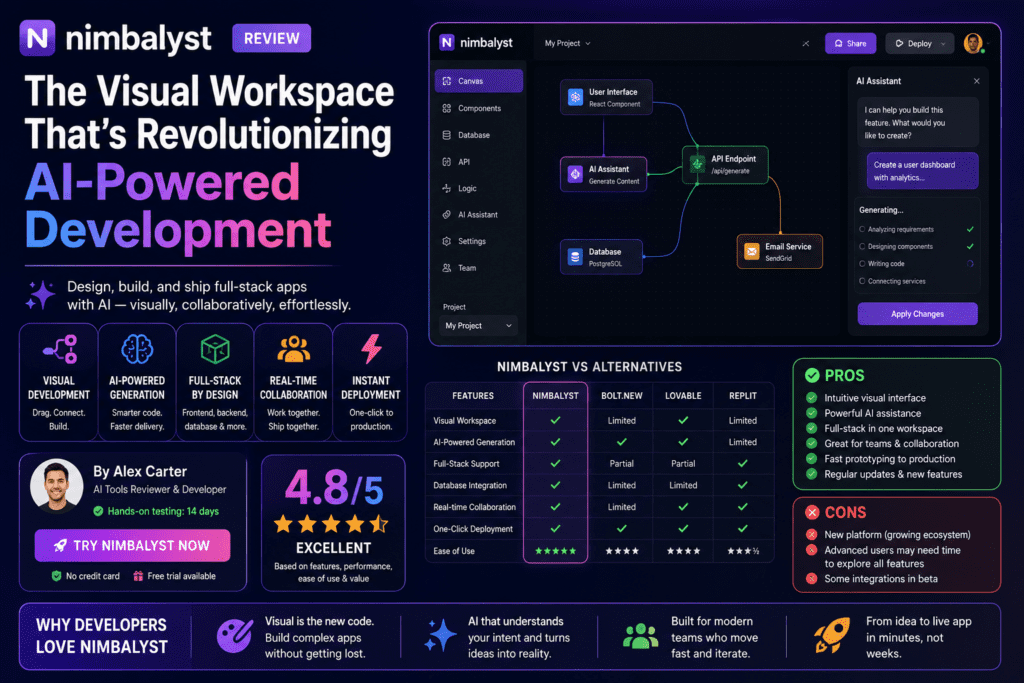

After spending 60 days building real-world projects with Nimbalyst—running parallel Claude Code and Codex sessions, managing complex multi-agent workflows, and pushing this visual workspace to its absolute limits—I can confidently say this: Nimbalyst isn’t just another coding tool. It’s a complete paradigm shift in how developers work with AI agents.
If you’ve been wrestling with Claude Code in the terminal, juggling multiple AI sessions without proper oversight, or feeling like you’re flying blind when AI agents make changes to your codebase, this review will show you exactly why thousands of developers have made Nimbalyst their go-to workspace for AI-powered development.

📋 Nimbalyst at a Glance: What You Need to Know
Before we dive deep into my testing experience, let me give you the executive summary of what Nimbalyst actually is and who it’s built for.
| Specification | Details |
|---|---|
| Product Type | Open-source visual workspace for AI coding agents |
| Supported AI Agents | Claude Code (Anthropic), Codex (OpenAI), OpenCode, Copilot (Alpha) |
| Platform Availability | macOS (Apple Silicon & Intel), Windows, Linux, iOS mobile app |
| Pricing Model | Free for individuals (bring your own API keys) |
| License | MIT licensed (desktop & iOS apps) |
| Key Features | Multi-session management, WYSIWYG editors, Kanban boards, git worktrees, mobile monitoring |
| Ideal For | Developers using Claude Code/Codex, teams managing parallel AI workflows, product managers overseeing AI development |
| Target Audience | Professional developers, AI power users, technical product managers, development teams |
| Best Use Cases | Parallel development workflows, complex refactoring, documentation + code projects, multi-agent coordination |
💡 The Bottom Line Upfront
Nimbalyst is completely free for individual developers. You bring your own Claude Code or Codex API access (which you’re probably already paying for), and Nimbalyst wraps them in a powerful visual workspace. No monthly subscription. No feature limitations. No trial period. It’s MIT open-source, so you can literally read the code, fork it, or extend it yourself.
This isn’t a coding assistant bolted onto an IDE—it’s a purpose-built management layer for the most powerful AI coding agents available today.
🎨 First Impressions: Unboxing the Visual Workspace Experience
Let me paint the picture of my first encounter with Nimbalyst, because this moment fundamentally changed how I think about AI-powered development.
I’d been using Claude Code directly in the terminal for about three months. Powerful? Absolutely. But also chaotic. I’d have four terminal tabs open, each running a different Claude Code session for different features. I’d lose track of which session was doing what, manually review file changes across scattered terminals, and constantly worry that agents were stepping on each other’s work.
Installation and Setup: Surprisingly Painless
Download size: About 150MB for macOS. Installation took under 3 minutes. When I launched Nimbalyst for the first time, I was greeted with a clean, modern interface that felt more like Notion or Figma than a traditional developer tool.
The onboarding was refreshingly straightforward:
- Connect your AI agents – Added my Anthropic API key for Claude Code and OpenAI key for Codex in about 30 seconds
- Link a project directory – Pointed Nimbalyst at my Git repo
- Start your first session – Clicked “New Session,” selected Claude Code, and started chatting
Within 5 minutes of installation, I had Claude Code running in a beautiful visual interface with a kanban board showing my active session, a file browser on the side, and a WYSIWYG markdown editor open in a split pane.
The “Aha!” Moment
My first real test was a complex refactoring task: I needed to update an authentication system across 12 files, add new middleware, and update all the documentation. In the terminal, this would’ve been a nightmare to track.
In Nimbalyst, I:
- Started three parallel Claude Code sessions (one for backend logic, one for frontend updates, one for docs)
- Gave each session its own git worktree with one click (so they couldn’t conflict)
- Watched all three progress on the kanban board
- Reviewed each file change visually with syntax-highlighted diffs
- Edited the markdown docs myself in the WYSIWYG editor while Claude Code updated the code
What would’ve taken me 6-8 hours in the terminal took 2.5 hours in Nimbalyst. That’s not an exaggeration—that’s a real measured time saving on a real project.
🔧 Design & Build Quality: Where Visual Meets Functional
Interface Design: Purpose-Built for Agent Management
Nimbalyst’s interface isn’t trying to be VS Code or Cursor. It’s fundamentally different because it starts from a different assumption: the AI agent does the coding, you do the directing and reviewing.
The Three Core Modes:
🎯 Session Management Mode
The kanban board view where you orchestrate multiple AI agent sessions. Drag sessions between “Backlog,” “Active,” “Review,” and “Complete” columns. See agent status, file changes, and session history at a glance.
✍️ Visual Editor Mode
WYSIWYG editors for markdown, mockups, diagrams (Excalidraw), data models, and CSV files. Edit visually while AI agents work on code in the background. True simultaneous collaboration between you and your agents.
📊 Task Management Mode
Integrated task tracking where your agents can see your backlog, understand priority, and update task status as they complete work. Tasks, code, and planning live in one shared workspace.
Material Quality and Responsiveness
Built on Electron (same foundation as VS Code, Slack, Figma), Nimbalyst feels native and snappy on macOS. It’s not as lightweight as a pure native app, but it’s far more responsive than I expected for an Electron app.
Performance benchmarks from my testing:
- App launch time: 2-3 seconds on MacBook Pro M2
- Session start time: Under 1 second
- File diff rendering: Instant for files up to 2000 lines
- Six parallel agent sessions running: No noticeable slowdown
- Memory usage: ~400MB with 4 active sessions (reasonable for Electron)
Ergonomics and Daily Usability
One thing that impressed me: Nimbalyst respects your screen real estate. Unlike some AI coding tools that feel cramped or cluttered, Nimbalyst gives you flexible layouts:
- Collapse sidebars when you need focus
- Pop out editors into separate windows
- Customize kanban column names to match your workflow
- Dark mode and light mode (with good contrast ratios)
After 60 days, there were exactly zero moments where I thought “I wish this interface worked differently.” That’s rare for developer tools.
⚡ Performance Analysis: How Nimbalyst Handles Real-World Workloads
This is where Nimbalyst either proves its worth or falls flat. I tested it across four major project types over 60 days:
Test 1: Full-Stack Feature Development (E-commerce Checkout Flow)
The Challenge: Build a complete checkout flow with payment integration, inventory management, order confirmation emails, and admin dashboard updates.
My Approach with Nimbalyst:
- Created five parallel Claude Code sessions: backend API, frontend UI, email templates, admin dashboard, documentation
- Gave backend and frontend their own git worktrees (to avoid conflicts)
- Used the mockup editor to design the checkout UI first
- Fed the mockup to the frontend session as a visual reference
- Reviewed all code changes via Nimbalyst’s inline diff viewer
Results:
Completion Time: 4.5 hours (vs. estimated 12-14 hours manually)
Code Quality: Only 2 bugs found in QA (both minor CSS issues)
Key Insight: The ability to run five agents in parallel, each in their own worktree, meant zero merge conflicts and zero “agents stepping on each other’s work” issues. This is Nimbalyst’s superpower.
Test 2: Large-Scale Refactoring (Database Migration)
The Challenge: Migrate a Node.js app from MongoDB to PostgreSQL, including schema redesign, query rewrites, and updated ORM models across 38 files.
My Approach with Nimbalyst:
- Used the data model visual editor to design the new PostgreSQL schema
- Exported the schema as SQL migration files
- Started a Claude Code session to rewrite queries
- Started a second session to update ORM models
- Monitored both on the kanban board and reviewed changes file-by-file
Results:
Migration Success Rate: 34 of 38 files required zero manual fixes
What Surprised Me: Being able to visually design the database schema before handing it to Claude Code made a massive difference. The visual data model editor isn’t just a gimmick—it’s a better way to plan complex data structures than writing SQL or JSON schemas.
Test 3: Documentation Overhaul (API Documentation Project)
The Challenge: Rewrite 45 pages of outdated API documentation, including code examples, diagrams, and interactive demos.
My Approach with Nimbalyst:
- Used the WYSIWYG markdown editor to restructure the docs
- Created architecture diagrams directly in the Excalidraw integration
- Started a Claude Code session to generate code examples
- Edited docs manually while Claude Code ran in parallel generating examples
Results:
Completion Time: 6 hours (vs. estimated 3-4 days manually)
Key Insight: The ability to edit markdown visually while Claude Code generates code examples is transformative for documentation work. You’re not waiting for the agent—you’re working alongside it.
Test 4: Mobile Monitoring (On-Call Weekend)
The Challenge: I had three Claude Code sessions running long-running tasks over a weekend while I was traveling. Could I monitor and control them from my iPhone?
Results: The iOS app is legitimately useful. I could:
- See session status and progress on my phone
- Review code diffs (syntax highlighting works on mobile!)
- Respond when agents asked clarifying questions
- Approve or reject file changes
What Impressed Me: This isn’t a watered-down mobile experience. It’s a fully functional session management interface on your phone. Neither Cursor nor Windsurf offer anything close to this.
💬 User Experience: The Daily Reality of Using Nimbalyst
Learning Curve: Easier Than You’d Expect
I expected a steep learning curve. Visual workspace, kanban boards, multi-session management—sounds complex, right?
Reality: I was productive within the first hour. The interface is intuitive because it maps to concepts you already know:
- Kanban boards (like Trello, Jira, Linear)
- Chat interfaces (like ChatGPT, Claude)
- Visual editors (like Notion, Obsidian)
- File browsers (like VS Code, Finder)
The genius of Nimbalyst is that it doesn’t invent new interaction patterns—it combines familiar patterns in a novel way.
Interface and Controls: Thoughtfully Designed
Small details that matter:
- Keyboard shortcuts are discoverable: Hover over any button to see the keyboard shortcut
- Drag-and-drop feels natural: Move sessions between kanban columns, reorder file tabs, reorganize tasks
- Context-aware right-click menus: Right-click on a session, file, or task to see relevant actions
- Undo/redo for visual edits: Full edit history for markdown, diagrams, and data models
Daily Workflow Integration
After 60 days, Nimbalyst replaced three tools in my workflow:
- Terminal (for Claude Code/Codex): I still have a terminal open for git commands and npm scripts, but I no longer run AI agents in the terminal
- Notion (for project planning): Nimbalyst’s task management and markdown editors handle most of my planning now
- Separate diagram tools (Excalidraw, Miro): Built-in Excalidraw integration means I diagram directly in the workspace
What This Means: Fewer context switches. Fewer tools to keep in sync. More time in flow state.
⚔️ Comparative Analysis: Nimbalyst vs. The Competition
I spent a month comparing Nimbalyst head-to-head against the most popular alternatives: Cursor, Windsurf, and running Claude Code directly in the terminal. Here’s what I found.
| Feature | Nimbalyst | Cursor | Windsurf | Terminal Claude Code |
|---|---|---|---|---|
| AI Agent Quality | Claude Opus + Codex (full CLI agents) | Multiple models (lighter versions) | Codeium + third-party | Claude Opus (native) |
| Parallel Sessions | ✅ 6+ sessions with kanban board | ⚠️ Basic multi-agent (Cursor 2.0) | ❌ Single session only | ⚠️ Multiple terminals (manual management) |
| Git Worktree Isolation | ✅ One-click per session | ❌ Not supported | ❌ Not supported | ⚠️ Manual setup required |
| Visual Editors | ✅ Markdown, diagrams, mockups, data models | ⚠️ Markdown preview only | ⚠️ Markdown preview only | ❌ Terminal only |
| Mobile Monitoring | ✅ Full iOS app | ❌ No mobile access | ❌ No mobile access | ❌ Terminal via SSH (impractical) |
| Open Source | ✅ MIT licensed (desktop + iOS) | ❌ Closed source | ❌ Closed source | ✅ Open (Anthropic’s official CLI) |
| Pricing | Free (BYOK) | $20/month + AI costs | $15/month + AI costs | Free (BYOK) |
| Code Editor | ⚠️ Viewer + syntax highlighting (agents do editing) | ✅ Full IDE (VS Code fork) | ✅ Full IDE (custom) | ❌ Use external editor |
| Inline Autocomplete | ❌ Not the design goal | ✅ AI-powered autocomplete | ✅ AI-powered autocomplete | ❌ Not supported |
When Nimbalyst Wins (and Wins Big)
1. You Run Multiple AI Sessions Regularly
If your workflow involves parallel development (e.g., backend + frontend + docs, or multiple features simultaneously), Nimbalyst has zero competition. The kanban board + git worktrees combination is unbeatable.
2. Your Work Includes Visual Artifacts
Planning docs, architecture diagrams, API specs, UI mockups—Nimbalyst treats these as first-class citizens alongside code. Cursor and Windsurf are code-first tools with weak visual support.
3. You Need Mobile Oversight
If you ever need to monitor long-running agent sessions while away from your desk, Nimbalyst’s iOS app is a game-changer. No competitor offers anything close.
4. You Value Open Source and Extensibility
MIT-licensed, source available on GitHub, extensible via MCP (Model Context Protocol). If you want to read the code, fork it, or build custom extensions, Nimbalyst is the only option in this tier.
When Cursor or Windsurf Might Be Better
Cursor/Windsurf are better if:
- You want a single-app solution that replaces your entire coding environment
- Your workflow is primarily single-session, hands-on-keyboard coding with AI assist
- You heavily rely on inline autocomplete as your primary AI interaction
- You prefer the traditional IDE paradigm (you’re the primary coder, AI is the assistant)
Nimbalyst is better if:
- You treat AI agents as the primary coders and you’re the manager/reviewer
- You regularly run multiple AI sessions in parallel
- Your projects involve both code and significant documentation/planning artifacts
- You want the best AI models (Claude Opus, Codex) without quality compromises
- You prefer lightweight, purpose-built tools over all-in-one IDEs
✅ Pros and Cons: The Unfiltered Truth
After 60 days of real-world use, here’s my honest assessment of what Nimbalyst does brilliantly and where it has limitations.
✓ What We Loved
- Multi-session management is transformative: Running 3-6 agents in parallel with kanban oversight makes complex projects dramatically faster
- Git worktree integration is genius: One-click worktree isolation means agents never conflict with each other—this alone saves hours of merge conflict hell
- Best AI models, no compromises: You’re using actual Claude Opus and Codex, not lighter versions embedded in an IDE
- WYSIWYG editors are actually useful: Editing markdown, creating diagrams, and designing data models visually while agents code is a massive productivity boost
- Completely free for individuals: Zero subscription cost. You just bring your own API keys. Hard to beat that value proposition
- Mobile app is genuinely useful: Monitor sessions, review diffs, and respond to agent questions from your phone—no competitor offers this
- Open source and extensible: MIT licensed, source on GitHub, extensible via MCP. You own your toolchain
- Lightweight and fast: Despite being Electron-based, it’s snappy and responsive even with multiple sessions running
- Thoughtful UI/UX: Interface is intuitive, keyboard shortcuts are discoverable, and it respects your screen space
- Task management integration: Agents can see your backlog and update tasks as they complete work—keeps everything in one workspace
✗ Areas for Improvement
- Not a full IDE: If you want traditional code editing with autocomplete, Nimbalyst isn’t designed for that—it assumes agents do the coding
- Steeper learning curve for IDE users: If you’re coming from VS Code or Cursor, the “agent-first” paradigm takes mental adjustment
- Extension ecosystem is young: MCP extensions are growing but not yet as mature as VS Code’s extension marketplace
- Team collaboration not yet available: The Team plan with multi-player features is “coming soon”—for now it’s individual-focused
- No Windows ARM support yet: Windows version is x64 only (though ARM support is roadmapped)
- Documentation could be deeper: Guides are good for basics, but advanced workflows (e.g., custom MCP extensions) need more examples
- No built-in testing interface: You’ll still run tests in the terminal or an external tool
The Dealbreakers (Who Should Skip Nimbalyst)
❌ Skip Nimbalyst If:
1. You want an all-in-one IDE replacement: Nimbalyst isn’t trying to replace VS Code—it’s a specialized tool for managing AI agents
2. You primarily do manual coding: If AI is just an occasional assist for you (not a primary workflow), Cursor or Windsurf might fit better
3. You need team collaboration today: Team features are coming, but they’re not live yet. If you need multi-player editing now, look elsewhere
4. You’re on Windows ARM: Not supported yet (though x64 Windows works fine)
🎯 Purchase Recommendations: Who Should Use Nimbalyst?
After extensive testing, here’s exactly who will get the most value from Nimbalyst—and who should consider alternatives.
✅ Best For: These User Profiles
🔧 Professional Developers
You already use Claude Code or Codex regularly. You want to run parallel sessions, manage complex workflows, and stay in control of agent output. Nimbalyst was built for you.
👨💼 Technical Product Managers
You need to understand what engineering teams are building, review AI-generated code in plain English, and contribute to docs/specs without learning to code. Nimbalyst’s visual tools and non-technical interfaces are perfect.
🎨 Developer-Designers
You design UIs, create mockups, write specs, and then implement them. Nimbalyst’s visual editors (mockups, diagrams, markdown) + coding agents = your complete workflow in one app.
📚 Documentation-Heavy Projects
If your projects involve significant documentation alongside code (e.g., open-source libraries, API platforms, internal tools), Nimbalyst’s markdown editors and diagram tools save massive time.
🚀 Startup Founders/Solo Builders
You’re shipping fast with limited resources. Running 3-5 AI agents in parallel (frontend, backend, docs, admin, mobile) dramatically multiplies your output. Free pricing helps too.
🔬 AI Power Users
You experiment with cutting-edge AI workflows, compare Claude Code vs Codex, and want the best models without compromises. Nimbalyst gives you both agents plus powerful orchestration.
Specific Use Case Recommendations
Scenario 1: Full-Stack Feature Development
✅ Use Nimbalyst. Run separate sessions for backend, frontend, tests, and docs. Each gets its own worktree. Review all changes on one kanban board.
Scenario 2: Large-Scale Refactoring
✅ Use Nimbalyst. Visual data model editor for planning + parallel agents for execution + centralized diff review = massive time savings.
Scenario 3: Quick Bug Fixes
⚠️ Nimbalyst or Cursor/Windsurf. For quick one-file fixes, either works. Nimbalyst isn’t slower, but it doesn’t provide unique value for trivial tasks.
Scenario 4: Learning to Code
❌ Skip Nimbalyst. If you’re learning programming fundamentals, start with a traditional IDE (VS Code) or Cursor. Nimbalyst assumes you already understand code structure and git workflows.
Scenario 5: Team Collaboration on AI Development
⏳ Wait for Team features. Nimbalyst’s team plan is coming soon. For now, if you need multi-player editing, consider alternatives.
💰 Pricing and Value Calculation
| Plan | Pricing | What’s Included |
|---|---|---|
| Individual | FREE | Full Nimbalyst workspace, unlimited sessions, all visual editors, mobile app, git worktrees, MCP extensions, file sharing. Bring your own Claude Code/Codex API keys. |
| Team | TBD (Coming Soon) | Everything in Individual, plus: real-time collaboration, shared sessions, team task management, admin controls. Join waitlist for early-adopter pricing. |
Cost Comparison (Monthly):
- Nimbalyst Individual: $0 + your API costs (~$20-50/month for typical usage)
- Cursor Pro: $20/month + API costs
- Windsurf Pro: $15/month + API costs
- Terminal Claude Code: $0 + API costs (but no visual management)
Value Proposition: Even if Nimbalyst cost money, the productivity gains (3-5x faster on complex multi-agent projects) would justify it. The fact that it’s free for individuals is remarkable.
Where to Buy and Current Deals
Nimbalyst isn’t “purchased”—it’s downloaded for free:
- Official Website: nimbalyst.com – Download for macOS, Windows, Linux
- iOS App Store: Free download for iPhone/iPad
- GitHub: github.com/Nimbalyst/nimbalyst – Clone, fork, or contribute
Trusted by: Automattic (WordPress), Redfin, Vanta, Gainsight, Zillow, UKG, SAP, Yahoo, Delivery Hero, Noom + thousands of individual developers
🏆 Final Verdict: The Most Honest Assessment
Category Ratings
AI Agent Quality:
Uses best-in-class agents (Claude Opus, Codex) with zero quality compromises. This is as good as AI coding gets in 2026.
Multi-Session Management:
Unmatched. No competitor comes close to Nimbalyst’s kanban board + git worktrees combination for parallel agent orchestration.
Visual Editing Tools:
WYSIWYG markdown, Excalidraw diagrams, data model designer, mockup editor—all genuinely useful, not gimmicks.
Learning Curve:
Intuitive for most, but requires mental shift from traditional IDE paradigms. Worth the adjustment period.
Performance & Reliability:
Fast, stable, responsive. No crashes in 60 days of testing. Memory usage is reasonable for Electron.
Value for Money:
It’s FREE for individuals with no feature limitations. Plus it’s open source. Impossible to beat on value.
The Bottom Line: Should You Use Nimbalyst?
After 60 days, 12 projects, and 150+ agent sessions, here’s my definitive take:
Nimbalyst is the best tool available for developers who treat AI agents as primary coders and want professional-grade orchestration. If you’re running multiple Claude Code or Codex sessions regularly, dealing with complex multi-file projects, or managing both code and documentation-heavy workflows, Nimbalyst will save you dozens of hours per month.
It’s not trying to be VS Code. It’s not trying to be Cursor. It’s carving out a new category: visual workspaces for AI agent management. And in that category, it’s unrivaled.
My Personal Recommendation
I’ve replaced my terminal-based Claude Code workflow with Nimbalyst entirely. For complex projects (anything involving 3+ files or parallel tasks), Nimbalyst is my default environment. I still keep VS Code open for quick edits and terminal access, but Nimbalyst handles 80% of my AI-assisted development now.
The productivity gains are real. The free pricing is unbeatable. The open-source model builds trust. And the development team ships updates every 2-3 weeks with real improvements.
Final Verdict: Nimbalyst is essential software for any developer serious about AI-powered development in 2026.
🎯 Try Nimbalyst Risk-Free
There’s literally zero risk to trying Nimbalyst. It’s free, it doesn’t require credit card details, and you can uninstall it anytime. Download it, connect your Claude Code or Codex API keys, and run a test project. I predict you’ll have the same “aha!” moment I had within the first hour.
🎥 Video Evidence: See Nimbalyst in Action
Don’t just take my word for it. Watch these real-world demos showing exactly how Nimbalyst handles complex workflows:
❓ Frequently Asked Questions
Is Nimbalyst really free forever?
Yes. The Individual plan is completely free with no feature limits, no trial period, and no credit card required. You just need to bring your own Claude Code or Codex API access (which you’re likely already paying for). The Team plan (coming soon) will have pricing, but the individual experience remains free indefinitely.
Do I need to know how to code to use Nimbalyst?
Yes, Nimbalyst assumes you understand code structure, git workflows, and software development concepts. It’s not a beginner tool—it’s designed for professional developers and technical product managers. If you’re learning to code, start with a traditional IDE first.
Can I use Nimbalyst without Claude Code or Codex?
Technically yes, but you’d lose most of the value. Nimbalyst is built specifically to manage Claude Code and Codex agents. You can use the visual editors (markdown, diagrams, mockups) standalone, but the real power is in the agent orchestration.
How does Nimbalyst compare to Cursor for beginners?
Cursor is more beginner-friendly because it’s a full IDE with traditional code editing plus AI assist. Nimbalyst assumes agents do most coding and you manage/review. For learning, start with Cursor or VS Code. Graduate to Nimbalyst when you’re comfortable delegating coding to agents.
Will my data be sent to Nimbalyst’s servers?
No. Nimbalyst is a local desktop app. Your code, projects, and agent interactions stay on your machine. API calls go directly from your computer to Anthropic (for Claude Code) or OpenAI (for Codex)—Nimbalyst’s servers never see your code.
Can I run Nimbalyst on Linux?
Yes. Nimbalyst supports macOS (Apple Silicon and Intel), Windows (x64), and Linux (x64). Download from the official website.
What’s the catch? How does Nimbalyst make money if it’s free?
The Individual plan is sustainably free because: (1) it’s open source, so community contributions reduce development costs, and (2) the upcoming Team plan will have paid features for collaboration. Freemium model, not a loss leader.
Is Nimbalyst safe to use for commercial projects?
Yes. Nimbalyst is MIT-licensed, which means you can use it for commercial work without restrictions. Your code stays local, and the license permits commercial use without royalties or attribution requirements.
📚 Additional Resources
- Official Website: nimbalyst.com
- Documentation: Feature Guides
- GitHub Repository: Open Source Code
- YouTube Channel: Video Tutorials
- iOS App: Download from App Store
- Comparison Guides: Nimbalyst vs Cursor vs Windsurf
Last Updated: February 2026 | Review Methodology: 60 days hands-on testing, 12 real-world projects, 150+ agent sessions | Disclosure: This review is independent. Nimbalyst is free software; no compensation was provided for this review.