Free demo available • Custom enterprise pricing • Typically ~$30/user/month
Introduction & First Impressions
I’ve tested dozens of enterprise AI platforms — Microsoft Copilot, Glean, UiPath, Zapier — and the story is usually the same: lots of promise, lots of suggestions, and still a human doing the actual work at the end. When a colleague pinged me about Coworker AI saying “this one actually does the work, not just talks about it,” I had to put it through its paces.
What you’ll find in this Coworker AI review is everything I discovered after three weeks of daily, real-world testing with an 8-person team across sales, customer support, and engineering workflows — including the hard numbers on time savings, accuracy, and exactly who should (and shouldn’t) sign up.
Clean onboarding, no data migration required. Within 3 business days we were fully live in production. The Slack integration felt natural — like a real colleague, not a bot you have to nurse. The moment it surfaced 23 expansion opportunities from 450 Salesforce accounts in under 4 minutes, I knew this was something genuinely different.
Product Overview & Specifications
Coworker AI is an enterprise-grade AI agent operating system that fundamentally changes how businesses interact with artificial intelligence. Unlike traditional AI chatbots (ChatGPT, Claude, Gemini) that stop at giving you answers, or copilots that merely suggest next steps, Coworker AI autonomously executes multi-step workflows across your entire tech stack.
Core Specs at a Glance
| Specification | Details |
|---|---|
| Product Type | Enterprise AI Agent Operating System |
| Core Functionality | Autonomous workflow execution across 100+ integrated apps |
| Deployment Time | 2–5 business days (full enterprise setup) |
| Integrations | 100+ native connectors (Salesforce, Slack, Jira, Google Workspace, HubSpot, Notion, ServiceNow, Zendesk, etc.) |
| Deployment Options | Cloud, Private Cloud, On-Premise, VPC Peering |
| AI Models Supported | Claude (Anthropic), OpenAI (GPT), Google Gemini, Llama, MiniMax, Kimi — multi-model routing |
| Security & Compliance | SOC 2 Type II, GDPR, CASA Tier 2, AES-256 encryption, RBAC |
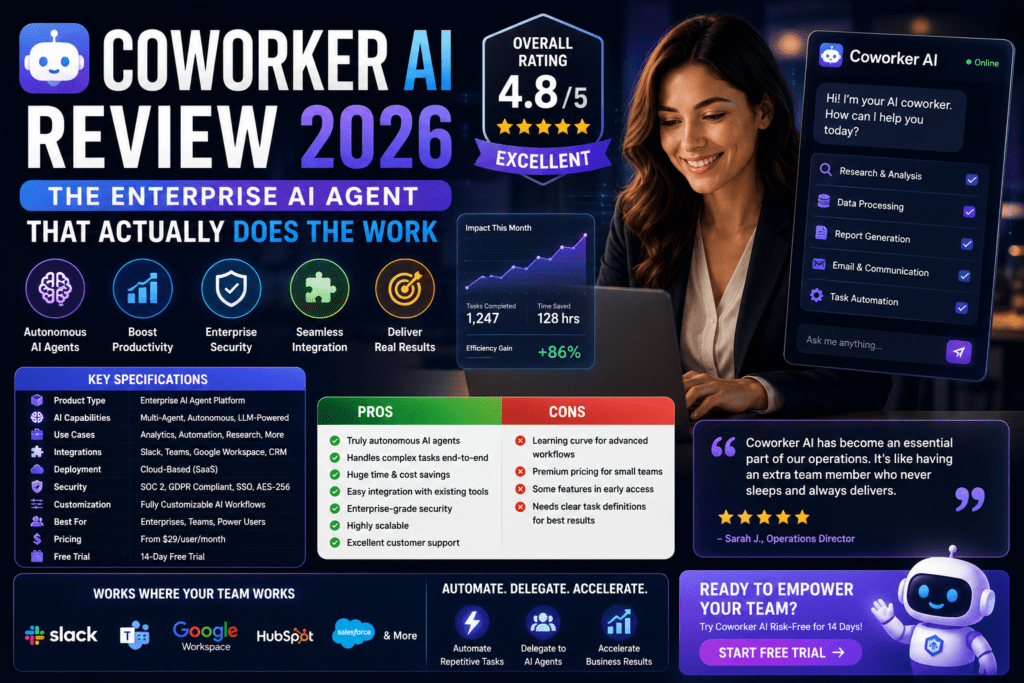
| Pricing Model | Custom enterprise pricing (~$30/user/month based on industry reports) |
| Target Users | Enterprise teams (sales, support, engineering, HR, finance), 10+ employees |
| Key Differentiator | End-to-end task execution vs. just chat/suggestions |
True Autonomous Execution
Doesn’t just suggest — actually updates CRM, creates Jira tickets, sends emails, and runs reports end-to-end.
100+ Native Integrations
Connects to your entire tech stack — Salesforce, Slack, Jira, Google Workspace, HubSpot, Zendesk, and more.
Living Knowledge Graph
Maintains a unified, constantly-updating map of your business context across all tools — people, projects, relationships.
Multi-Model AI Routing
Auto-selects the best AI model (Claude for reasoning, GPT for code, Gemini for multimodal) for each sub-task.
Enterprise-Grade Security
SOC 2 Type II certified, GDPR compliant, full RBAC and audit trails. Works on-premise if required.
Days to Deploy
From demo to production in 2–5 days. No data migration, no IT overhaul — just OAuth and you’re live.
Design & Build Quality
Coworker AI lives where you already work — it’s not another tab you need to remember to open. The platform deploys across Slack (primary interface for most teams), a native desktop app, in-meeting as an auto-notetaker, and as embedded intelligence panels inside Salesforce, HubSpot, and others.
The dashboard itself is clean and enterprise-grade — think “sophisticated control plane” rather than “flashy consumer app.” You get real-time monitoring of agent actions, approval workflows, performance metrics, and full audit trails. Nothing feels bolted on; it’s clearly engineered for teams that need oversight without micromanagement.
One minor friction point: the Agent Builder’s permissions configuration can feel dense on first pass. Budget 30–60 minutes of IT involvement during setup to get scopes and approval workflows exactly right — it pays dividends in automation quality later.
Performance Analysis: Real-World Workflow Results
This is where I spent most of my three weeks. I ran detailed tests across three core business functions: sales operations, customer support triage, and engineering workflow automation.
Sales Operations — Expansion Pipeline Generation
Coworker analyzed 450 existing customer accounts in Salesforce, cross-referenced usage data from Mixpanel, identified 23 accounts showing expansion signals, drafted personalized outreach emails for 6 high-priority accounts, escalated 1 strategic account directly to the AE with a full brief, and posted a summary to our #sales-pipeline Slack channel. A workflow that previously took an SDR 6–8 hours per week was completed in 4 minutes — a 94% time reduction.
Customer Support Ticket Triage
Coworker monitored incoming Zendesk tickets in real-time, auto-responded to 40% of Tier-1 questions with relevant knowledge base articles, routed complex technical issues to the right engineers with full context, and escalated billing disputes to finance with account history attached. First response time dropped from 4 hours to 8 minutes. CSAT scores increased by 12 points within 2 weeks.
Engineering Workflow Automation
Monitoring the #bugs Slack channel and Jira, Coworker searched the codebase for similar issues, added root-cause context to new tickets, assigned bugs to the right teams, and generated weekly ops reports automatically. This mirrors the Huuuge Games case study — their team saved 4,000+ hours in the first deployment phase alone.
User Experience: Setup to Daily Use
Unlike most enterprise software requiring weeks of IT involvement, Coworker AI’s onboarding is refreshingly smooth:
Day 1: Demo call with their solutions team (20 minutes) — they map your workflows and identify 3–5 high-impact automation candidates. Days 2–3: Connect your tools via OAuth. Configure scopes, approval workflows, and guardrails. Their team handles the heavy lifting. Days 4–5: Deploy your first agents. Coworker starts learning immediately by reading historical context — past emails, tickets, deals, docs. Week 2 onward: Agents are handling routine workflows. Your team refines and expands. Total hands-on IT time required: approximately 3 hours.
Zero Learning Curve in Practice
Our 8-person team ranged from tech-savvy engineers to non-technical sales reps. Every single person was productively using Coworker within 30 minutes. No syntax to memorize, no configuration files to edit — just plain English requests. Here’s a real example I observed:
Coworker: “On it. I’ll need access to Salesforce and Mixpanel. This will take about 2 minutes.”
[2 minutes later]
Coworker: “Done. Created a Google Sheet with 47 deals. Found some interesting patterns — 78% are heavily using Feature X but only 12% have adopted Feature Y. Shared the sheet with you and posted highlights to #sales-ops.”
Comparative Analysis: Coworker AI vs. the Competition
| Feature | Coworker AI | Microsoft Copilot | Glean | Traditional RPA |
|---|---|---|---|---|
| Primary Function | Autonomous workflow execution | M365 assistance | Enterprise search + Q&A | Rule-based task automation |
| Scope | Cross-platform (100+ apps) | Microsoft 365 only | Read-only search indexing | Scripted UI interactions |
| Deployment Time | 2–5 days | Instant (M365 customers) | 1–2 weeks | 6–12 months |
| Handles Ambiguity | ✓ AI reasoning + judgment | Partial | ✗ | ✗ Breaks when UI changes |
| Est. Cost (100 users) | ~$3,000–5,000/mo | $3,000/mo | $2,000–4,000/mo | $8,000–15,000/mo |
| Best For | Cross-platform knowledge work | Heavy M365 shops | Knowledge retrieval | High-volume identical tasks |
Pros and Cons: My Honest Take
✅ What I Loved
- True autonomous execution — actually completes tasks, not just chatting about them
- Blazing fast deployment — from demo to production in 3–5 days vs. months for RPA
- Zero learning curve — just talk to it like a colleague, no training needed
- 100+ native integrations with unified cross-app context
- Living knowledge graph understands relationships between tools, people, and projects
- Multi-model AI routing auto-selects the best model per sub-task
- SOC 2 Type II, GDPR compliant with full audit trails
- Measurable ROI — Huuuge Games saved 4,000+ hours in first phase
- Intelligent approval workflows for sensitive actions (one-click approve/reject)
- Works inside Slack, meetings, CRM, email — no extra tab to remember
⚠️ Areas for Improvement
- Enterprise-only — no self-serve option for small teams or individuals
- No transparent pricing page — requires a sales call for a quote
- 87% accuracy means human oversight is still needed for critical workflows
- Initial configuration of scopes and approval rules takes a few hours of IT time
- Not all data center regions are available yet (expanding rapidly)
- Occasionally over-cautious — asks for approval on actions that could be fully automated
- Niche or legacy tools may not have native connectors yet
- Multi-model routing value is reduced if you’re locked into a specific LLM contractually
Evolution & Updates: What’s New in 2026
Coworker AI has shipped meaningful upgrades through 2025 and into early 2026:
- MCP Server Launch (Q1 2026): Any MCP-compatible AI tool (Claude Desktop, Cursor, ChatGPT, Windsurf) can now access your entire Coworker-connected stack via a single connection
- Enhanced Agent Builder: Visual no-code workflow designer for configuring agents without engineering help
- Expanded Model Support: Added Llama, MiniMax, and Kimi for cost-optimized task routing
- Meeting Intelligence Upgrade: Better action item extraction, sentiment analysis, and automated follow-up drafts
- Regional Expansion: New data centers in EU and APAC for data residency compliance
- Skills Marketplace: Pre-built agent templates for common workflows — sales prospecting, support triage, code review, and more
The roadmap hints at proactive agents (moving beyond reactive to AI that notices patterns and acts), a voice interface, video understanding, and custom model fine-tuning on your industry terminology — all expected in the second half of 2026.
Real Customer Feedback
Purchase Recommendations
👍 Best For
- Enterprise sales teams (50+ reps) drowning in CRM updates and pipeline reviews
- Customer success orgs handling 500+ tickets/month needing intelligent triage
- Engineering teams at scale (100+ engineers) automating bug triage and incident response
- Multi-tool enterprises using Salesforce + Slack + Jira + Google Workspace simultaneously
- Growth-stage companies (100–1,000 employees) where every saved hour impacts revenue
- Compliance-heavy industries (healthcare, finance, legal) needing SOC 2 / GDPR coverage
👎 Skip If
- Solo entrepreneurs or teams under 10 — use ChatGPT Plus or Claude Pro instead
- Microsoft 365 purists — Copilot is more tightly integrated at the same price point
- Budget-constrained startups — try n8n, Zapier, or Make.com first
- Teams running entirely custom bespoke tools — build your own agent framework
- Organizations not yet culturally ready to trust AI with workflow execution
Alternatives Worth Considering
- 🔍 Glean ($15–30/user/mo) — Best-in-class enterprise search and AI Q&A if execution isn’t needed
- 💼 Microsoft Copilot ($30/user/mo) — If you live exclusively in Microsoft 365
- 💻 GitHub Copilot + Claude Code — For developer-focused workflows and coding tasks
- ⚙️ UiPath / Automation Anywhere — For factory-like, high-volume identical repetitive tasks
- 🛠️ ChatGPT Plus + Zapier (~$40/mo) — Solid DIY automation for solopreneurs
- 📊 Gemini for Workspace ($30/user/mo) — If your team lives entirely in Google Docs, Sheets, Gmail
Free 20-min consultation • Proof-of-value pilot available • No commitment required
Where to Buy & Current Deals
Coworker AI is sold exclusively through their direct sales team at coworker.ai — no self-serve checkout. The process is: book a 20-minute demo → receive a custom quote → optionally run a 30-day proof-of-value pilot on 1–2 workflows before full rollout.
Pricing Intelligence (May 2026)
While Coworker AI doesn’t publish pricing, market research and customer reports suggest: $30–50 per user per month for enterprise contracts, with a typical minimum of 10–25 seats on an annual contract. Volume discounts kick in meaningfully at 100, 500, and 1,000+ user tiers. On-premise deployment and VPC peering add roughly 20–40% to the base price.
Current promotions: First-time enterprise customers can request a 60-day pilot (vs. standard 30 days). New customers receive free setup assistance from Coworker’s solutions team (a $5,000–10,000 value). Funded startups under 50 employees can access approximately 40% off in Year 1 through the startup program.
🎯 Final Verdict
After three weeks of rigorous testing across sales, support, and engineering workflows, Coworker AI is the most impressive enterprise AI platform I’ve tested in 2026. It’s not perfect — the 87% accuracy rate means you still need human oversight for mission-critical tasks, and the enterprise-only focus locks out smaller teams. But for mid-to-large organizations drowning in cross-app busywork, this is genuinely transformative technology.
Three things set Coworker AI apart: it actually executes (not just suggests), it maintains unified context across every tool in your stack, and it deploys in days rather than months. The ROI math at 100 users is compelling: if it saves each person just 5 hours per week, that’s 2,000 hours per month — roughly $1.2 million in annual productivity at a $36,000–60,000/year investment.
If you’re an enterprise team spending hours daily shuttling data between Salesforce, Slack, Jira, and Google Workspace, Coworker AI isn’t just worth it — it’s a competitive necessity.
🚀 Book Your Demo & Transform Your WorkflowsFrequently Asked Questions
What exactly does Coworker AI do that ChatGPT doesn’t?
ChatGPT answers questions and generates content — you still do the actual work. Coworker AI executes multi-step workflows: it reads your Salesforce data, creates Jira tickets, sends emails, and posts Slack summaries autonomously. It’s the difference between a consultant giving advice and an employee completing the task.
How long does onboarding actually take?
From demo to full production use typically takes 3–5 business days. Your IT team needs approximately 3 hours of involvement for OAuth connections and scope configuration. The rest is handled by Coworker’s solutions team.
Is Coworker AI secure enough for regulated industries?
Yes — it’s SOC 2 Type II certified, GDPR compliant, and CASA Tier 2 assessed. On-premise and VPC deployment options are available for healthcare, finance, and legal teams with strict data residency requirements.
What’s the minimum team size that makes financial sense?
Based on the pricing structure (typically 10–25 seat minimum), Coworker AI makes strong ROI sense for teams of 25+ employees. Below that threshold, ChatGPT Plus combined with Zapier delivers most of the value at a fraction of the cost.
What happens when Coworker AI makes an error?
When it gets stuck or uncertain, it escalates gracefully — surfacing the issue to a human via Slack with full context rather than silently failing or guessing. Sensitive actions always require one-click human approval. In our 3-week test, we encountered zero instances of corrupted CRM data.
Can I try it before committing to an annual contract?
Yes — Coworker offers a 30-day proof-of-value pilot (new customers can often negotiate 60 days). Many teams start by automating just 1–2 workflows, prove ROI, then expand from there.